Welcome to Faana Growth OS
The intelligence layer for human systems. Faana Growth OS measures leaders in context — not as static assessments, but as human systems under real environmental pressure — connecting behavioral intelligence, organizational fitness, and network dynamics to surface risk before it shows in financials.
Who Is This Guide For?
Coaches & Facilitators
You are the data source. Every session note, voice recording, and coded document builds the behavioral intelligence at the heart of Faana's Leadership Genome. This guide shows you how.
Administrators
You manage the entities and data infrastructure that turn raw coaching observations into organizational intelligence. The Intelligence Hub is your command center.
Technical Team
Dive into the API reference, architecture diagrams, and security model to understand how everything connects.
Faana is a Human Systems Intelligence and Talent Infrastructure company built on 23 years of methodology. It exists to build the Human Infrastructure that organizations are missing — four pillars: Capacity (leaders elevated for output, not ability), Culture (operating system failure, not vibes), Care (removed from the architecture of work — 50M+ invisible caregivers), and Connected Capital (investment decisions disconnected from human system context).
The platform measures organizational fitness across four pillars — Leadership (LeaderOS), Team (TeamOS), Organizational (OrgOS), and Community (CommunityOS) — using the Growth Operating Framework and 10 Leadership Qualities as its diagnostic core. The Growth OS is one of three interconnected systems: GrowthOS (intelligence + diagnostics), Talent Transformation (development + matching), and Community Benefits (care infrastructure + impact).
The platform is continuously building the Leadership Genome — the measurable pattern of behavioral signatures that define conscious, effective leadership — derived from coding observations across hundreds of real leaders. Anonymized data feeds the Faana Data Collective, a public benefit research structure enabling academic partnerships, benchmarking, and the Innovation Deficit Research Initiative.
2. Platform Overview
Two Apps, One Platform
Faana Growth OS is delivered through two complementary applications, both powered by the same backend infrastructure. The split is intentional: the Workbench meets coaches where intelligence is generated — in the field, between sessions, in moments of live observation. The Hub is where that intelligence is analyzed, structured, and acted on. They serve different cognitive modes, not just different screen sizes.
Mobile-First Coach-Facing
Desktop Admin / Analyst
Several features appear in both apps: Behavioral Workbench, Care (CCM), Faana AI Chat, and Settings. They share the same backend data — work done in one app is immediately visible in the other. The Behavioral Workbench is designed for desktop use and is best experienced in the Intelligence Hub.
Architecture at a Glance
The platform is designed to ingest unstructured behavioral data — conversations, documents, observations — strip it of PII, resolve named entities across contexts, embed it for semantic search, and surface patterns that no individual coach could see in isolation. The infrastructure exists to make that possible at scale: 19 Express.js APIs on Google Cloud, with data stored across Firestore, Elasticsearch, BigQuery, and Cloud Storage, powered by Vertex AI (Gemini models).
Platform architecture: Two React apps → 19 Express APIs on Cloud Run → multi-store data layer → Vertex AI
Beneath the tech stack, the platform produces three types of intelligence:
- Behavioral Intelligence — Leadership Genome signals from observations coded against the 10 Leadership Qualities in the Behavioral Workbench
- Organizational Fitness — GOF diagnostic data measuring risk, stance, story, and orientation across 8 organizational blocks
- Network Intelligence — SNA relationship maps, centrality metrics, and community detection from cross-document entity analysis
The Token Examiner, PTL, and SNA APIs constitute the Intelligence Pipeline — the analytical engine that is distinct from the operational APIs (notes, auth, ingestion).
Technical Details: Infrastructure Stack
| Layer | Technology | Purpose |
|---|---|---|
| Frontend | React, Material-UI, TipTap | Two SPAs (Workbench + Hub) |
| API | Express.js on Firebase Functions v2 | 19 REST APIs on Cloud Run |
| Primary DB | Firestore | Entities, permissions, notes, configs |
| Search & Vectors | Elasticsearch 8.11 | Global Token Pool, SNA embeddings (768-dim) |
| Analytics | BigQuery | Large-scale data analysis |
| File Storage | Cloud Storage (GCS) | Documents, backups, ingested files |
| AI/ML | Vertex AI (Gemini 2.5 Flash, 2.0 Flash, 1.5 Pro) | Entity analysis, report generation, chat |
| Embeddings | text-embedding-004 | 768-dimensional vectors for semantic search |
| Agent Framework | LangChain | Tool-calling agents for AI chat |
| Auth | Firebase Authentication | Google Sign-In (@faanaworks.com domain) |
| Encryption | Cloud KMS | PII tokenization key management |
3. Getting Started
Logging In
When you first visit either app, you'll see a clean login screen with a "Sign in with Google" button and the Faana Growth OS branding. After authentication, the Workbench takes you to Coach Home and the Hub takes you to Entity Management.
Selecting an Entity
Today, most features in Faana Growth OS are entity-scoped. An entity represents an organization, person, program, or community that you're working with. After logging in, you select which entity you want to work with. This selection persists across sessions in your browser's local storage — you won't need to re-select each time.
In the Workbench, entity selection happens via the entity pill in the app header or the Entity Context Switch in the hamburger menu. In the Intelligence Hub, there's a prominent entity selector dropdown in the sidebar.
In Faana's world, an "entity" is anything you track and develop: a company, a leader, a coaching program, or a community network. Each entity has its own data, permissions, and growth metrics. Entity types include Organization, Person, Program, and Community. See the Key Concepts section for more.
Where We're Headed: User-Scoped Data
The current entity-first model requires coaches to select an entity before they can do anything — record a note, ask a question, upload a document. This creates friction in the moments that matter most: when a coach is in the middle of a conversation, capturing a live observation, or dictating a reflection on the drive home. Forcing entity selection at those moments breaks flow and reduces data capture.
The platform is shifting to a user-scoped data model where everything a coach creates — voice recordings, notes, uploads, chat conversations — is captured under their user account first, with entity attribution handled by the system afterward. Entity selection becomes an optional view filter rather than a data gate. You can still narrow your view to Coffee Co when you want focused context, but you don't have to select an entity to use the platform.
How It Works: GTP-Powered Resolution
The technical foundation for this shift already exists. When data enters the platform, the Privacy Tokenization Layer (PTL) identifies every person, organization, and location mentioned. Those tokens are registered in the Global Token Pool (GTP) — an Elasticsearch index that serves as the platform's identity resolution backbone. The Token Examiner then runs multi-pass AI analysis to discover entities and relationships, generating confidence scores and match suggestions against known entities.
In the new model, this pipeline runs on everything a coach creates, regardless of whether they've selected an entity:
- High-confidence matches (GTP + Jaro-Winkler similarity above 0.95) auto-link to the resolved entity immediately — a note mentioning "James Whitfield" and "Coffee Co" connects to those entities without the coach lifting a finger.
- Low-confidence matches (0.80–0.95) queue in the Entity Discovery review panel for the coach or admin to confirm, just as discovered entities work today.
- Unresolvable data remains in the coach's personal workspace, searchable and available but not yet entity-linked — ready to be attributed when more context emerges.
What Changes for Coaches
The daily experience gets simpler. Open the Workbench, start talking to Faana AI, dictate a note with the recorder, or drop a file into Notebook — no entity selection needed. The system knows who you are, recognizes the entities you mention, and routes intelligence to the right places. Entity selection becomes a lens you choose to apply when you want a focused view, not a gate you must pass to get started.
This approach also unlocks cross-entity intelligence naturally. A coach working with three organizations will see patterns and connections that emerge across their entire portfolio, because the data isn't siloed by entity at the point of creation — only at the point of viewing and permissions. This connected view is also the foundation for Precision Fit — the platform's ability to match leaders to opportunities, coaches to clients, and solutions to problems based on behavioral patterns that emerge across context, not just within a single engagement.
Navigation
Faana Workbench Navigation
The Workbench uses a bottom navigation bar (mobile pattern) with five primary destinations:
| Icon | Destination | Description |
|---|---|---|
| Home | Coach Home | Your coaching portfolio and org/leader player cards |
| Care | Care (CCM) | Connected Community Model resources and player cards |
| Notebook | Notebook | Rich-text notes with audio recording and attachments |
| Reports | Reports | Engagement analytics and AI report generation |
| Chat | Faana AI | AI assistant with streaming, voice, and MCP tools |
Additional features are in the hamburger menu (top-left): Entity Context Switch (for changing your active entity), Admin Dashboard (admin-only), Behavioral Workbench, and Help & Support. Settings is accessed from the user avatar menu (top-right).
Intelligence Hub Navigation
The Hub uses a left sidebar (280px, collapsible to 64px icon-only mode) with primary navigation and a hamburger menu for additional tools:
Primary Sidebar:
| Section | Pages |
|---|---|
| Care | Connected Community Model (same data as Workbench) |
| Faana AI | AI chat with streaming, voice, and MCP tools |
| Entities | Entity Management (Entity Discovery, Existing Entities, New Entity, Bulk Import, Global Token Pool) |
Hamburger Menu (additional tools):
| Section | Pages |
|---|---|
| Faana Agents | Agent Personas, Smart Templates, IP Catalogue |
| Behavioral Workbench | Desktop-optimized document coding interface |
| Data Sources | Data Sources, Process Visibility, Ingestion Points, Shared Drives |
| Admin | User Management, Brand Assets, Import Rollbacks, Audit Log (admin-only) |
The sidebar also shows an Auth Status indicator: a green check when your token is valid, or a red icon when authentication needs refreshing. A "Test Auth" menu item forces a re-check.
The Behavioral Workbench has its own keyboard shortcuts for document navigation and coding
(see Section 5.4). Standard browser shortcuts (Esc
to close modals, Cmd/Ctrl + Enter to submit in chat) work throughout both apps.
4. Faana Workbench
The Faana Workbench is the daily companion for coaches. Designed mobile-first (optimized for 390×844 viewport), it puts everything a coach needs within two taps: your portfolio health at a glance, deep player cards for every organization and leader, AI-powered report generation, coaching notes with audio capture, the full Connected Community Model, and an AI assistant that can query your entity's data in real time. The Workbench is where Faana's intelligence becomes actionable — where GOF scores turn into coaching conversations, behavioral codes become reports, and network dynamics inform strategy.
Voice & Recording: How Coaches Feed the Intelligence Engine
The Faana Workbench is built for coaches who are always in motion — driving between sessions, walking into a meeting, debriefing in a parking lot. Voice isn't an add-on; it's the primary way coaching intelligence enters the system. Every word a coach speaks — whether captured as an audio note, dictated into a chat, or transcribed from a recorded session — becomes data that the platform transforms into structured leadership intelligence.
This matters because of what happens next. When a coach records an observation about a leader's communication style, that recording is transcribed, and the transcript flows through the Privacy Tokenization Layer (PTL) to protect sensitive information. The Global Token Pool (GTP) resolves every person, organization, and program mentioned into known entities — or discovers new ones. The Token Examiner analyzes relationships between those entities across documents. And the SNA vector store embeds the text for semantic search and behavioral coding. The coach just spoke into their phone. The platform built a richer map of organizational reality.
Two Voice Systems, One Purpose
The Workbench provides two complementary voice capabilities, each designed for different coaching moments:
| System | When to Use | What Happens |
|---|---|---|
| Audio Recorder | Capturing raw observations, post-session reflections, meeting notes | Records audio with live transcription, saves as a searchable note with the audio file attached. The Floating Recorder — a collapsible red FAB with pulsing timer — stays visible as you navigate between pages. |
| Voice Chat | Asking questions, looking up data, getting AI coaching insights hands-free | Say “Hey Coach” (customizable wake word) to activate. Speak your question, say “send now” to submit. The AI responds with text and optional Kokoro TTS voice (28 voices, configurable in Settings). |
A Day in the Life: Four Scenarios
You just left a two-hour session with Coffee Co's leadership team (already selected as your active entity). On the drive back, you tap the Capture button, select Audio, and start recording your observations. The Floating Recorder collapses to a pulsing red timer in the corner — you can glance at it to confirm you're still recording. You speak freely for eight minutes: who said what, the tension between James and Derek on the restructuring, how Sarah stepped up unexpectedly.
When you stop recording, a Save Audio Note modal appears with an AI-generated title
(summarized from your transcript), editable description, recording date, tags, entity assignment, and
visibility settings — most fields are pre-populated, so you just review and save. You tag it
coffee-co, session-debrief and tap Save. Once the audio note enters the
ingestion pipeline, PTL tokenizes names for privacy, GTP resolves “James,”
“Derek,” and “Sarah” to their entity records, and the SNA vector store creates
new embeddings that connect these leaders to the themes you described.
You're preparing for tomorrow's session and your hands are full. You say “Hey Coach —
what were the main themes from my last three sessions with Coffee Co?” The Faana AI Chat
activates, searches your notes via the search_entity_notes MCP tool, cross-references
behavioral codes from the SNA vector store, and speaks back a synthesis: “Your last three
sessions focused on communication pathways risk, Derek's resistance to the new reporting structure,
and a positive shift in Sarah's learning agility scores.”
You follow up: “Show me Derek's leadership quality scores — send now.”
The AI calls get_leader_profile and reads back his 10 Leadership Quality breakdown.
No screen, no typing — just voice.
You're walking into a stakeholder meeting and remember something from last week's observation. You pull out your phone, tap Audio in the Capture menu, and record a 30-second note: “Noticed that Maria in the Portland office has started facilitating the weekly standup — this is new behavior, possible courage indicator.”
That's 30 seconds of effort from you. Once the note enters the ingestion pipeline, GTP resolves “Maria” and “Portland office” as entity mentions — even if Maria hasn't been formally added to the system yet. She enters the Entity Discovery queue for review. When you later process documents in the Behavioral Workbench, this note is available as source material. If another coach mentions Maria in their notes, GTP links the references together — the SNA fabric grows a new node.
Over the past month, you've accumulated dozens of voice notes, chat transcripts, and uploaded session documents. Now you open the Behavioral Workbench (via the hamburger menu) to code these observations against the 10 Leadership Qualities. The three-panel interface shows your documents on the left, the coding panel in the center, and the quality taxonomy on the right.
As you highlight a passage from a transcribed voice note — “James pushed back on the proposed timeline but offered an alternative that incorporated Derek's concerns” — and code it under Adaptability and Cross-Cultural Communication, you're not just tagging text. You're creating structured behavioral evidence that feeds GOF assessments, leader quality scores, and the AI reports that synthesize weeks of observation into actionable insights. The voice note you recorded while driving became a data point in a leader's growth trajectory.
The Intelligence Pipeline
Every coaching interaction — every voice note, chat question, uploaded document, behavioral code — feeds the same intelligence pipeline:
- Capture — Coach speaks, types, or uploads (Audio Recorder, Notebook, Chat, file upload)
- Protect — PTL tokenizes sensitive information across eight categories (personal identifiers, government IDs, financial data, HIPAA-relevant health information, credentials, digital identifiers, demographics, and organizational references) before any data is stored or processed
- Resolve — GTP matches mentions to known entities or queues new discoveries
- Embed — SNA vector store creates semantic embeddings for similarity search
- Analyze — Token Examiner finds cross-document relationships; Behavioral Workbench adds structured codes
- Synthesize — AI Reports, Chat queries, and GOF scores all draw from this growing intelligence
The SNA fabric doesn't just record what you know — it discovers connections you haven't seen yet. As data accumulates, entity relationships emerge organically. Leaders who were mentioned in separate contexts get linked. Behavioral patterns across engagements become visible. The platform's understanding of organizational reality deepens with every coaching interaction — and it never forgets.
Building Human Infrastructure
What makes this pipeline extraordinary is what it produces. Faana exists because four critical pillars of Human Infrastructure are missing from how organizations grow:
| Pillar | The Gap | What Faana Builds |
|---|---|---|
| Capacity | Leadership capacity deficit at scale — organizations grow faster than leaders develop | The 10 Leadership Qualities, GOF assessments, and behavioral coding create a measurable, longitudinal view of leadership development |
| Culture | Culture as operating system failure — values are stated but not practiced | SNA relationship mapping and cross-document analysis surface the actual behavioral patterns in an organization, not the aspirational ones |
| Care | Care has been removed from the architecture of work — people don't have what they need | The Connected Community Model (CCM) and the Care Currency flywheel embed care into the operational fabric, not as a benefit bolted on |
| Connected Capital | Capital is disconnected from context — investment decisions lack human system intelligence | Risk intelligence, entity fitness metrics, and portfolio-level analytics give investors and stakeholders contextual understanding of organizational health |
Every voice note a coach records, every behavioral code applied in the Workbench, every entity resolved by GTP — these aren't just features. They are the raw material for building this infrastructure.
The Leadership Genome
As coaching data accumulates, something powerful emerges: the Leadership Genome — Faana's term for the measurable pattern of traits, competencies, intelligences, and behavioral signatures that define conscious, effective leadership. Not a single profile, but a genome that varies by context while sharing core DNA: self-awareness (emotional, relational, systemic), nervous system regulation, adaptive capacity, relational intelligence, values alignment between stated and practiced, and the capacity to hold complexity without collapsing into simplicity.
The Leadership Genome is built from the bottom up. When a coach codes a voice note in the Behavioral Workbench against the 10 Leadership Qualities, that structured observation becomes a data point. Multiply that across hundreds of leaders, dozens of organizations, and years of longitudinal observation, and a pattern language emerges — one that can identify early signals of leadership growth or organizational risk before they show up in financial metrics.
This is the core of Faana's thesis: leadership, culture, and organizational performance are the largest unpriced risks in modern business. By the time these show up in earnings reports, value has already been lost. Faana surfaces risk earlier — in the behavioral and relational signals that precede organizational breakdown, interpreted against the environmental conditions creating the pressure.
From Coaching to Research: The Data Collective
The intelligence that coaches create doesn't just serve the immediate engagement. It feeds the Faana Data Collective — a public benefit research structure that houses anonymized, aggregated Leadership Genome and Organizational Fitness data as a shared asset.
What this enables:
- Scientific research — Academic partnerships studying the measurable link between leadership development, organizational design, and innovation capacity. Faana's Innovation Deficit Research Initiative is actively seeking institutional collaborators to prove this thesis with academic rigor.
- Risk intelligence — Investors and boards get contextual risk signals that connect Whole Person Leadership Fitness to environmental factors (capital constraints, market volatility, talent access, regulatory shifts), producing organizational risk and fitness metrics across hundreds of variables.
- Precision Fit — Diagnostic-driven matching of talent to opportunities, coaches to organizations, and solutions to problems. Not guessing based on resumes — matching based on behavioral and contextual data that the platform has observed over time.
- Care at scale — Understanding what leaders and communities actually need — childcare, food security, housing, health coaching, legal support — measured through the Care Currency flywheel where doing good work automatically generates Tokens of Care that fund support for those in need.
- Benchmarking and data products — Leadership Genome benchmarks, organizational fitness assessments, and behavioral indexes that give organizations a comparative view of their human systems health.
- Private and public data partnerships — Governed datasets available for research into human systems, leadership development, and organizational performance — with clear governance about what the data can and cannot be used for.
This is why every coaching interaction matters beyond the immediate session. A coach recording a post-session reflection while driving is contributing to a growing body of evidence about how leaders develop, how organizations change, and what human infrastructure actually looks like when it's measured, not assumed. The SNA vector indexes that embed these observations don't just power today's AI reports — they become the foundation for research products, risk models, and care systems that serve leaders and communities at a scale no single coaching engagement could reach.
The Floating Recorder
One UX detail worth highlighting: the Floating Recorder is designed so recording never interrupts your workflow. When you start an audio capture, the recorder collapses to a small pulsing red FAB showing a live timer (e.g., “0:47”). You can navigate to any page — check a leader's player card, review a report, look something up in Chat — and the recorder stays visible in the corner, still capturing. Tap it to expand and see the volume meter (green/yellow/red based on amplitude), pause/resume, or stop. When you stop, the metadata modal appears for title, tags, and notes. The recording is saved, transcribed, and enters the intelligence pipeline automatically.
For full technical details on each system, see Notebook (Audio Notes), Faana AI Chat (Voice I/O & wake word), and Settings (voice configuration with 28 Kokoro TTS voices).
4.1 Coach Home
CompleteCoach Home is your daily launchpad — the first thing you see when you open the Workbench. It answers the question every coach asks first: "Where do I need to focus today?" The page shows your entire coaching portfolio at a glance, with real-time health indicators that surface risk and progress without requiring you to dig into each engagement. The GOF risk scores on every org card are not just coaching metrics — they are the earliest signals of organizational risk, visible months before they surface in financial performance.
Coach Home operationalizes three foundational principles from the Faana Method:
- The Nervous System is the First Leadership System — The Zone System (Green/Orange/Red/Crimson) on every leader card reflects nervous system state, not personality. A leader in Red Zone isn't a "bad leader" — they're a leader whose nervous system is dysregulated, which prevents them from reading the room, regulating reactions, and building psychological safety.
- The Organization is a Complex, Dynamic System — The GOF Grid reveals where energy flows and where friction exists across 8 interconnected blocks. You cannot optimize Mission (what we do) if Connection Elements (do people feel safe?) has collapsed.
- Engagement is a Dynamic Interactional State Variable — Not a personality trait. Engagement changes based on conditions, which is why the platform tracks it as a signal, not a score.
Without Coach Home, coaches would operate from cognitive dominance — knowing what to do but lacking the diagnostic visibility to see where the system is actually breaking. This is the exact pattern the Phantom Leadership theory describes: present in position, absent in presence.
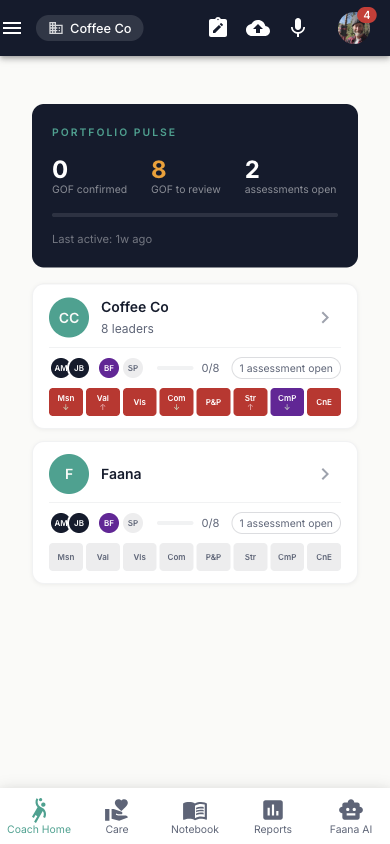
Portfolio Pulse
The Portfolio Pulse card (dark background, teal accents) sits at the top and gives you a cross-portfolio health check. At a glance, you see: how many GOF blocks are confirmed vs. need review, how many assessments are open, your overall confirmation progress (percentage bar), and when you were last active. The amber highlight on "GOF to Review" tells you immediately if something needs attention. This isn't decoration — it's a triage tool.
Client Cards
Below the Pulse is a drag-and-drop sortable list of your coaching assignments. Reorder them to match your priority (the order persists across sessions). Each card shows the entity name, type, zone color (Green/Orange/Red/Crimson), and engagement stats. Tap any card to open that organization's Player Card.
Org Player Card
Tapping an organization opens its Org Player Card — a comprehensive view of that organization's fitness and leadership landscape. Think of it as a "baseball card" for the organization: everything you need to know at a glance, with the ability to drill deeper into any dimension. The card surfaces the organization's narrative storyline, its GOF scorecard (8 blocks measuring organizational fitness from Mission to Connection Elements), its main cast of leaders (with zone colors showing risk levels), coaching pod composition, and EIR data.
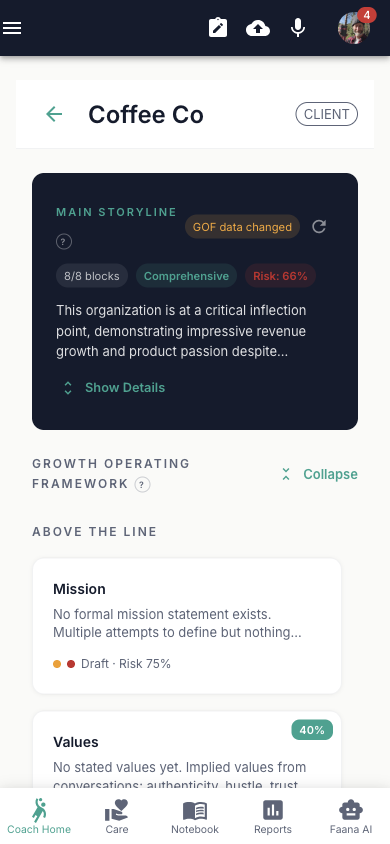
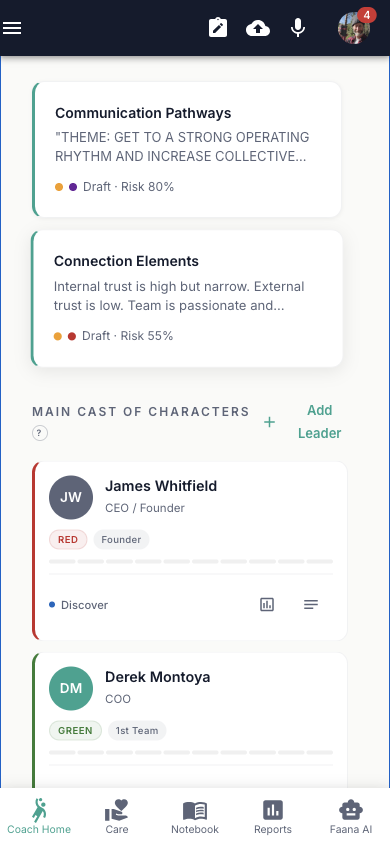
Org Player Card: Complete Contents
Main Storyline (AI-Generated)
An AI-generated organizational narrative synthesized from the entity's GOF blocks, last 50 coaching notes (90 days), and last 10 coach assessments. Powered by Gemini 2.5 Flash with structured JSON output. The storyline includes:
- Overall narrative — multi-paragraph synthesis of the organization's current state (displayed clamped to 3 lines with "Show Details" toggle)
- Completion status — readiness level (early/developing/substantial/comprehensive) with completed block count chip
- Risk assessment — average risk score across GOF blocks
- Strategic themes — ordered list of emerging themes from the data
- Block summaries — per-block summary with key insight, coaching implication, and risk score (clickable — opens the GOF Block Modal)
- Recommendations — prioritized action items tagged critical/important/suggested with related block references
Auto-loads on page entry (cached in Firestore with SHA hash for staleness detection). Shows a yellow "GOF data changed" chip when the underlying data has been updated since last generation. Elapsed time counter during regeneration ("Synthesizing organizational narrative... Xs").
GOF Grid (Growth Operating Framework)
A visual scorecard of 8 blocks organized in two tiers. The mini-strip shows 8 block thumbnails (tap any to open the GOF Block Modal). An "Expand Grid / Collapse Grid" toggle reveals the full grid:
Above the Line (ATL) — 6 blocks in a 3-column grid:
| # | Block | Weight |
|---|---|---|
| 1 | Mission | — |
| 2 | Values | 40% |
| 3 | Vision of a Better Place | 30% |
| 4 | Core Community | — |
| 5 | Purpose & Point | 20% |
| 6 | Strategy on the Field | — |
Below the Line (BTL) — 2 blocks in a 2-column grid (teal left border):
| # | Block |
|---|---|
| 7 | Communication Pathways |
| 8 | Connection Elements |
Each block card displays: label, content preview, status dot (color-coded), risk dot (if score > 0), and status + risk labels.
GOF Block Modal (per block)
Tapping any GOF block opens a full-screen modal (slide-up on mobile) with these controls:
- Status selector chips: Not Started (gray) / Draft (amber) / Reviewed (teal) / Confirmed (green)
- Risk Score Slider: 0–100, color-coded: Green (≤25), Orange (≤50), Red (≤75), Crimson (>75)
- Rich Text Editor: TipTap-based content area for block narrative
Block-specific form fields:
| Block | Special Fields |
|---|---|
| Mission | Single rich text area + tooltip |
| Core Values | Rich text overview + dynamic list of name/behavioral expression pairs (Add/Remove per row) |
| Vision of a Better Place | Single rich text area + tooltip |
| Core Community | Founder (name+notes), CEO (name+notes), 1st Team list (name+role, Add/Remove), People Leaders list (name+role, Add/Remove) |
| Purpose & Point | Single rich text area + tooltip |
| Strategy on the Field | Rich text overview + 8 horizon fields: Now / 90 Days / 6 Months / 12 Months / 2 Years / 3 Years / 5 Years / 10 Years |
| Communication Pathways | Rich text overview + 5 fields: Decision Frameworks / Meeting Cadence / Feedback Channels / Storytelling Loops / Leadership Signals |
| Connection Elements | Rich text overview + 5 fields: Psychological Safety / Belonging Signals / Trust Patterns / Emotional Resonance / Energy & Morale |
Each block also has a collapsible Revision History section with past revisions (timestamp, diff view on click) and an AI History Summary panel (auto-fetched on modal open) that generates a narrative of how the block has evolved over time, including what was added and what was removed. Individual revisions have a "Generate AI Summary" button that produces a change-level narrative comparing that revision to its predecessor. Both use Gemini 2.5 Flash. A "Regenerate" button refreshes the summary. A discard confirmation dialog appears when closing with unsaved changes.
Main Cast of Characters (Leader Grid)
A grid of leader cards showing name, tier chip, zone color, and engagement phase. An "Add Leader" button opens a bottom sheet drawer with fields for: name, email, title, tier (Founder / 1st Team / Managers of People / Rising Leader), zone (Green / Orange / Red / Crimson / Unassessed), and engagement phase. Tap a leader to navigate to their Person Player Card.
Pod Section
Shows the coaching pod name, member avatars (as an AvatarGroup), and member list with role chips.
EIR Section
The EIR (Entity-in-Relationship) section shows how this organization relates to its talent ecosystem. It includes an EIR Profile Card displaying the current Executive-in-Residence assignment and an EIR Assignment Dialog for matching talent to the organization. The underlying data model and API endpoints are complete, though the full Precision Fit matching analysis (a separate tab on Person Player Cards) is built but not yet launched — it will activate in a future release.
Person Player Card (Leader Card)
Tapping a leader within an org opens their Person Player Card — the most data-rich view of any individual in the system. The card brings together GOF scores, the 10 Leadership Qualities, behavioral intelligence from coded documents, network dynamics, and historical tracking across engagement periods. The header shows an avatar circle (initials with zone-color background), leader name, title, and engagement stats.
The card has three tabs that build a complete picture of the leader:
- Leadership Fitness (Tab 0) — The primary assessment view. Shows the leader-scoped GOF grid (8 blocks, same structure as the org card but scoped to this leader's data) and a detailed breakdown of all 10 Leadership Qualities. Each quality row shows a 5-level score (Never / Rarely / Sometimes / Often / Frequently), revision count, and expands to reveal: score buttons, notes (auto-saved with 800ms debounce), revision history, and a Signal Intelligence section showing 30-day SNA results — relationship signals extracted from tokenized documents that connect behavioral codes to observable patterns in the leader's network dynamics.
These scores don't come from a survey. They are built from behavioral evidence — voice notes and documents coded in the Behavioral Workbench against the 10 Leadership Qualities. Each score is only as meaningful as the evidence behind it.
- Visualize (Tab 1) — A Leadership Radar Chart (SVG-based spider visualization) that plots all 10 quality scores simultaneously, making it easy to spot strengths, gaps, and imbalances at a glance. Labels use abbreviations (CUR, CRG, VUL, PPP, LA, DET, SSA, CCC, ADP, CON) with concentric grid rings at 25/50/75/100 levels.
- Network (Tab 2) — An Ego Network visualization (D3-based concentric layout) showing this leader at the center, surrounded by rings of connections: direct relationships (1-hop) in the inner ring, secondary connections (2-hop) in the outer ring. Node size reflects degree centrality (more connected = larger), colors indicate entity type, and edge thickness shows relationship strength. This visualization reveals who the leader actually influences, who they depend on, and where their network has gaps.
A Viewing Period Selector (chips: Current / Last 90 Days / Prior Recalibration / Baseline) lets you load historical snapshots, enabling coaches to see how a leader's scores and network have evolved over time. Historical periods display a read-only banner.
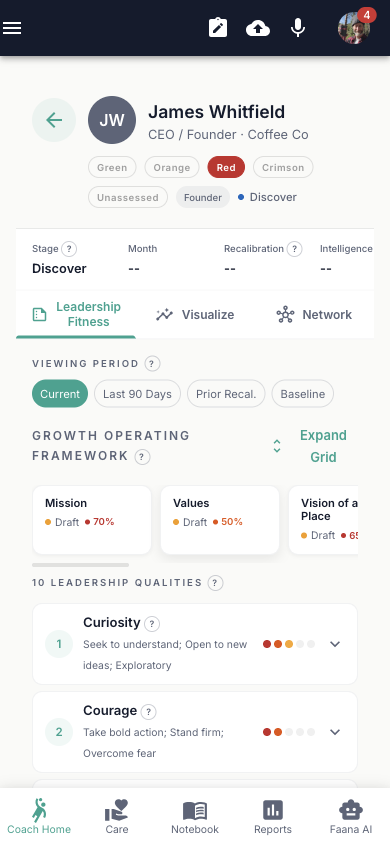
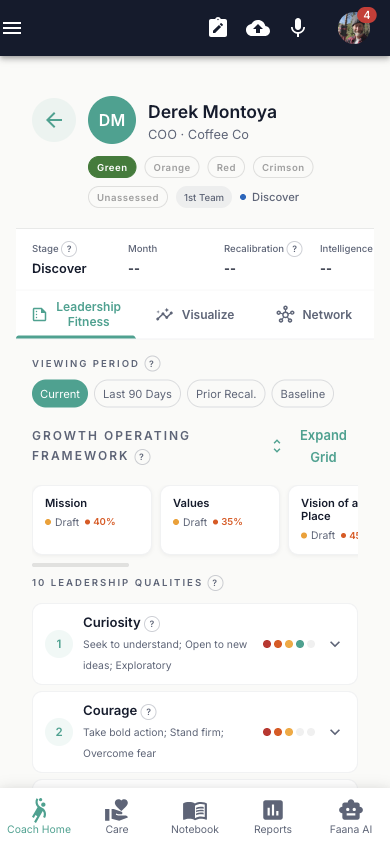
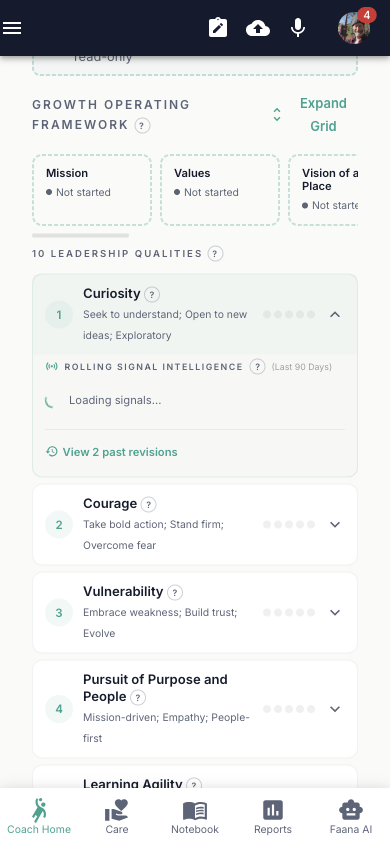
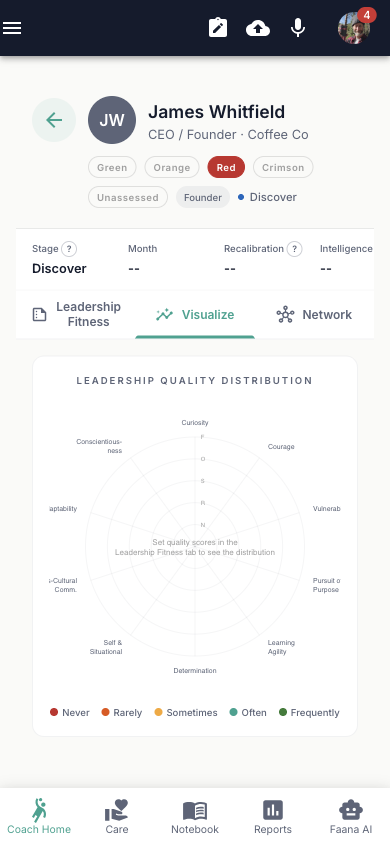
Person Player Card: Complete Contents
Header Controls
- Zone selector chips: Green / Orange / Red / Crimson / Unassessed (clickable to update)
- Tier chip: Founder / 1st Team / Managers of People / Rising Leader
- Engagement phase dot + label
- Engagement stats bar: Stage | Month | Recalibration | Intelligence
Viewing Period Selector
A chip row for: Current / Last 90 Days / Prior Recalibration / Baseline. Changing the period loads historical snapshot data. When a historical period is selected, a read-only banner is displayed.
Tab 0 — Leadership Fitness
- GOF mini-strip (8 thumbnails, tap to open leader-scoped GOF Block Modal)
- "Expand Grid" toggle for full leader-scoped GOF Grid
- Assessment Section for custom leadership assessments
- 10 Leadership Quality Rows, one per quality:
- Curiosity
- Courage
- Vulnerability
- Pursuit of Purpose and People
- Learning Agility
- Determination
- Self and Situational Awareness
- Cross-Cultural Communication
- Adaptability
- Conscientiousness
Each quality row collapses to show: quality name, current score dots (5-level), and revision count. Expanding a row reveals:
- 5 score buttons: Never (1) / Rarely (2) / Sometimes (3) / Often (4) / Frequently (5)
- Notes textarea (auto-saves with 800ms debounce)
- "View Revisions" button opening a revision history modal
- Signal Intelligence section showing 30-day SNA results
Tab 1 — Visualize
A Leadership Radar Chart (spider/radar visualization) plotting all 10 quality scores with abbreviated labels: CUR, CRG, VUL, PPP, LA, DET, SSA, CCC, ADP, CON.
Tab 2 — Network
An Ego Network Panel — a D3-based concentric ego network visualization showing this leader's connections and influence within the organization.
Note: The EIR (Entity-in-Relationship) Precision Fit tab is built but intentionally hidden — it will be launched in a future release.
The Precision Fit tab will activate AI-powered matching analysis — using behavioral and contextual data from the Leadership Genome to evaluate fit between leaders and opportunities, coaches and organizations, or talent and roles. Built and ready; launching in a future release.
4.2 Reports
CompleteReports is where coaching intelligence becomes a deliverable. The page combines real engagement data — days active, leaders tracked, phase progress — with AI-powered report generation that pulls from your entity's GOF scores, leadership qualities, SNA relationship data, and coaching notes to produce structured, professional reports across 16 report types in four categories. Finalized reports are also structured evidence — the behavioral change documentation they contain contributes to the longitudinal dataset that powers the Faana Data Collective and the Leadership Genome research mission.
Curative Theory states: "In a world where AI can do the thinking, the only leadership that matters is the kind that heals people." Reports embody this by letting AI handle the synthesis (data gathering, pattern recognition, narrative construction) so coaches can focus on what AI cannot do — presence, vulnerability, embodied care. Without automated intelligence reports, coaches would spend hours compiling data instead of coaching.
Reports also serve as proof of impact for the coaching methodology: zone placement trajectories (Red → Orange → Green), quality score progression, and behavioral change documentation provide evidence that Faana's neuroscience-based approach produces measurable results. The 90-day engagement timeline aligns with neuroscience research on behavioral change consolidation.
The 90-Day Engagement Timeline
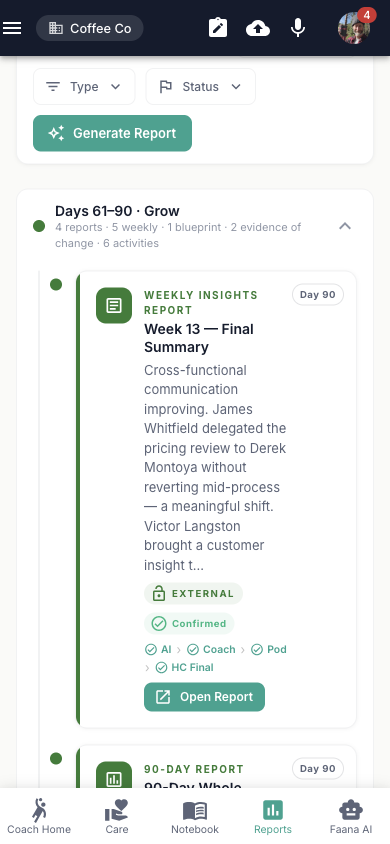
Reports are organized around Faana's 90-day engagement cycle. The Engagement Summary Card at the top shows where you are in the journey — from initial discovery through sustained growth:
- Discover (days 1–14) — Initial assessment, getting to know the organization
- Diagnose (days 15–30) — Deeper analysis, identifying patterns and risks
- Align (days 31–60) — Strategy development, building shared understanding
- Grow (days 61–90) — Sustained development, measuring change
Each phase has its own collapsible section with report cards and activity entries. As you progress through the engagement, reports accumulate under the appropriate phase — creating a living timeline of the coaching relationship.
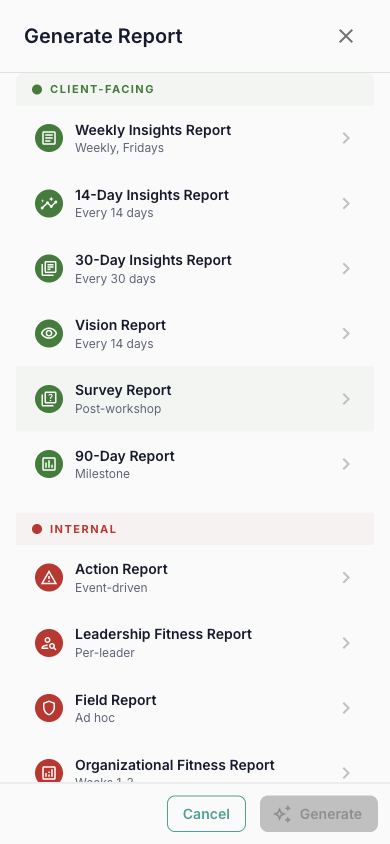
Report Categories
Reports span four categories, each designed for a different audience and purpose:
| Category | Report Types | Who It's For |
|---|---|---|
| Client-Facing | Weekly Insights, 14-Day Insights, 30-Day Insights, 90-Day Report, Vision Report, Survey Report | Shared with the client organization to show progress and insights |
| Internal | Action Report, Field Report, Leadership Fitness, Org Fitness, Situation Report | For the coaching team — tactical, candid assessments |
| Recurring | Brand Report, Trust Report, Energy Report, Culture Report | Regular pulse checks on specific dimensions of organizational health |
| Advanced | Head Coach Summary | Aggregated view for head coaches overseeing multiple engagements |
How AI Report Generation Works
When you tap "Generate Report," the platform runs a 5-step pipeline that transforms raw entity data into a polished, structured document:
- Select Type — Choose from the report type grid. Each type has a pre-built
HTML template with variables (e.g.,
{{socialNetworkImpact}},{{leadershipFitnessScore}}) - Date Range — Set the reporting period and comparison window
- AI Generation — The backend extracts template variables, then runs parallel AI calls (up to 5 concurrent Gemini requests) to populate each variable. The AI pulls from GOF assessments, leadership quality scores, SNA relationship data, coaching notes, and behavioral codes — synthesizing a narrative for each section. A progress bar shows real-time status (e.g., "12 of 18 variables processed")
- Editor — Review and edit the generated report. Each section is editable with rich text (contenteditable). You can move, add, or delete sections, and each shows an "AI-generated" indicator so you know what to review
- Finalize — Lock the report, set its workflow status, and distribute. Reports follow a 4-step workflow: AI → Coach → Pod → HC Final
Finalized reports can be printed, exported as PDF, or sent directly to pod members and entity leaders via the Send Report dialog.
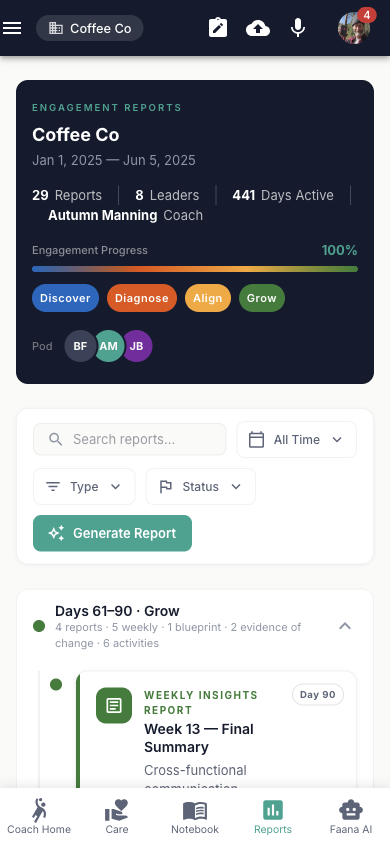
Reports: Complete Feature Detail
Engagement Summary Card
The top card (dark background) displays:
- "Engagement Reports" overline (teal)
- Entity name (bold) with description or date range subtitle
- Stats row: Reports count | Leaders count | Days Active count | Coach name
- Engagement Progress: percentage with gradient progress bar (blue→orange→yellow→green)
- Phase chips (4): Discover (days 1–14) / Diagnose (15–30) / Align (31–60) / Grow (61–90). Active phases show filled, inactive show outlined
- Pod avatars: AvatarGroup showing up to 4 team members
Reports Toolbar
- Search: TextField with "Search reports..." placeholder
- Date Range filter: All Time / Last 90 Days / Last 60 Days / Last 30 Days / Last 14 Days
- Type filter (multi-select with four categories):
- Client-Facing: Weekly Insights, 14-Day Insights, 30-Day Insights, 90-Day Report, Vision Report, Survey Report
- Internal: Action Report, Field Report, Leadership Fitness, Org Fitness, Situation Report
- Recurring: Brand Report, Trust Report, Energy Report, Culture Report
- Advanced: Head Coach Summary
- Status filter (checkboxes with colored dots): Draft (amber) / Reviewed (teal) / Confirmed (green)
- "Generate Report" button (teal, AutoAwesome icon)
Period Groups
Reports are organized into 4 collapsible sections by engagement phase: Discover / Diagnose / Align / Grow. Each section shows a day range, report cards, and activity entries. Report cards display type chip, title, date, status dot, and workflow step indicators. Sections with real reports auto-expand.
Report Generation Workflow (5 Steps)
| Step | Name | Description |
|---|---|---|
| 1 | Select Type | Grid of report type cards to choose from |
| 2 | Date Range | Date range selector + timeline day picker |
| 3 | Generating | Loading UI (AI generates report from entity data) |
| 4 | Editor | Editable sections with rich text (contenteditable), per-section menu (Move Up/Down, Add/Delete Section), AI-generated indicator |
| 5 | Finalized | Read-only report viewer |
Workflow Steps & Actions
Each report tracks four workflow steps: AI → Coach → Pod → HC Final, each showing completed/pending status. Available actions vary by step:
- Back, Save Draft, Mark Reviewed, Finalize (with confirmation dialog)
- Print, Download PDF (export endpoint)
- Send: Opens SendReportDialog to select recipients from pod members + entity leaders and compose a message
- Close (discard confirmation if unsaved changes)
As the Data Collective grows, reports will include benchmarked comparisons — how this organization's GOF scores and leadership quality trajectories compare to anonymized peer cohorts. Coaching engagements will gain context within a larger body of organizational evidence.
4.3 Notebook
Complete
Notebook is where coaching observations are captured in the moment. Whether you're typing notes
during a session, recording audio with live transcription, or uploading documents after a meeting,
everything flows into a searchable, entity-scoped note system synced to the cloud.
Notes aren't just for reference — they feed the AI. When you ask Faana AI Chat about a leader,
it searches your notes via the search_entity_notes MCP tool. When the Behavioral
Workbench processes documents, your notes provide context. When reports are generated, your
observations become source material.
Every note is a data point in the Leadership Genome — the accumulating behavioral record that the platform uses to surface patterns, inform GOF assessments, and detect risk. For the full picture of what happens after a note is saved, see Voice & Recording: The Intelligence Pipeline.
The rich text editor (TipTap-based) supports full formatting, and notes have visibility controls (Private / Public / Role-based) so sensitive coaching observations stay protected while team-relevant notes are shared with the coaching pod. Audio notes capture voice recordings with live transcription via Web Speech API — ideal for post-session reflections while driving.
Notebook: Complete Feature Detail
Note List
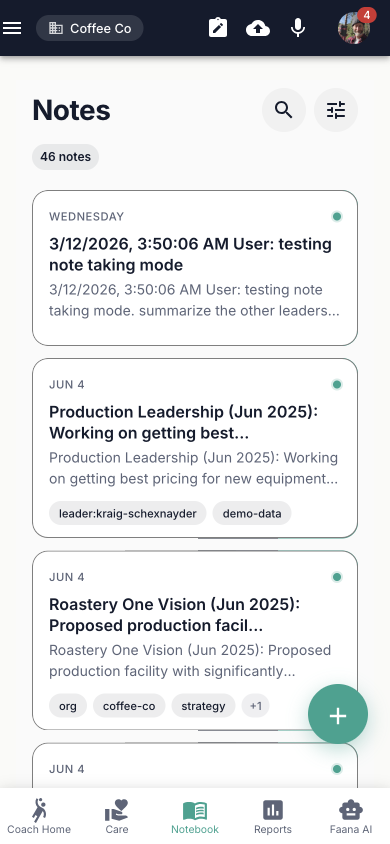
A searchable, filterable list of all notes for the selected entity. Each note card shows:
- Title and content preview (120 characters)
- Relative date (Today / Yesterday / day name / MMM d format)
- Entity name chip
- Visibility indicator: Private (lock icon) / Public (teal dot) / Role-based (gold dot)
- Tags (up to 3 shown, "+N" overflow chip)
- Attachment count badge
- Headphone icon if the note contains audio
- Lock icon if the note is immutable
On mobile, notes are swipeable: swipe left reveals Edit (blue) and Delete (red) action buttons.
TipTap Rich Text Editor
The editor toolbar provides:
| Group | Controls |
|---|---|
| Text Formatting | Bold, Italic, Underline, Strikethrough, Highlight |
| Alignment | Left, Center, Right |
| Lists | Bullet List, Ordered List, Blockquote, Code Block |
| History | Undo, Redo |
Note Create/Edit Dialog
- Title text field
- Entity scope selector (which entity the note belongs to)
- Visibility selector: Private / Public / Role-based
- Tags autocomplete (free-form, comma-separated)
- Full TipTap editor with formatting toolbar
- Attachments list (existing files with remove option)
- Audio player (for audio notes with waveform playback)
SpeedDial FAB (Bottom-Right)
- New Note (NoteAdd icon)
- File Upload (CloudUpload icon) — drag-and-drop supported
- Audio Recording (Mic icon) — live transcription via Web Speech API
- Share (Share icon)
Audio Notes
The Audio Recorder starts the browser's MediaRecorder, provides live transcription via the
Web Speech API, and saves the audio blob + transcript as a note. Audio notes are tagged with
audio-note and render with a headphones icon and an audio player with waveform visualization.
4.4 Care (CCM)
PartialCare is not a feature — it's economic infrastructure. The Connected Community Model (CCM) addresses one of Faana's four structural deficits: care has been removed from the architecture of work. Over 50 million Americans are invisible caregivers. The CCM brings care back into the system by mapping and curating the resources a leader, team, or organization needs to thrive — not just professionally, but as whole people.
The Four Pillars
Every entity's Care page is organized around four interconnected domains. Together, they form a complete picture of the support ecosystem around a leader or organization:
| Pillar | What It Means | Example Resources |
|---|---|---|
| Capacity | The skills, knowledge, and operational resources needed to build and sustain leadership. This is the "can you do it?" pillar — coaches, trainers, programs, and development resources that expand what leaders and teams are capable of. | Executive coaches, leadership development programs, skills trainers, mentors, operational consultants |
| Care | Wellbeing, emotional health, and support infrastructure. This is the "are you okay?" pillar — the resources that sustain the human behind the leader. Faana believes you cannot build leadership fitness on a foundation of personal fragility. | Wellness coaches, EQ specialists, resilience programs, mental health resources, childcare services, health coaching |
| Capital | Financial resources, strategic guidance, and funding access. This is the "can you fund it?" pillar — connecting leaders to the financial ecosystem they need, from advisors to investors to financial literacy programs. | Financial advisors, growth strategists, angel investors, grant programs, financial fitness coaches |
| Community | Networks, relationships, and peer groups. This is the "who's with you?" pillar — the recognition that no leader succeeds in isolation. Community resources create belonging, accountability, and access to collective intelligence. | CEO peer networks, leadership forums, alumni communities, industry cohorts, mentorship circles |
How It Works
Each pillar displays a horizontal row of resource tiles — people, organizations,
programs, and communities that have been curated for this entity. Coaches can add resources manually
or use Faana AI Chat (via the search_care_resources and add_to_care
MCP tools) to find and add resources conversationally. In Coach Mode, tiles can be reordered,
pinned to the top, or removed. Each resource tile opens a full Player Card modal with snapshot,
vision, company details, and highlights.
The Care Economy Vision
The CCM in Growth OS is the data layer for a larger vision: the Coordinated Care & Currency Network and Tokens of Care — where doing the work of leadership development well automatically funds care for those in need. This is not a feature roadmap item — it is the reason the CCM exists. The Care Currency flywheel is the mechanism that converts leadership development work into direct material care for leaders and communities in need. The Care Currency Card (physical and digital) will power a closed-loop care economy on financial rails. The platform's Care page today builds the foundation for that future by mapping who needs what, who provides it, and how those connections create measurable impact.
Care (CCM): Complete Feature Detail
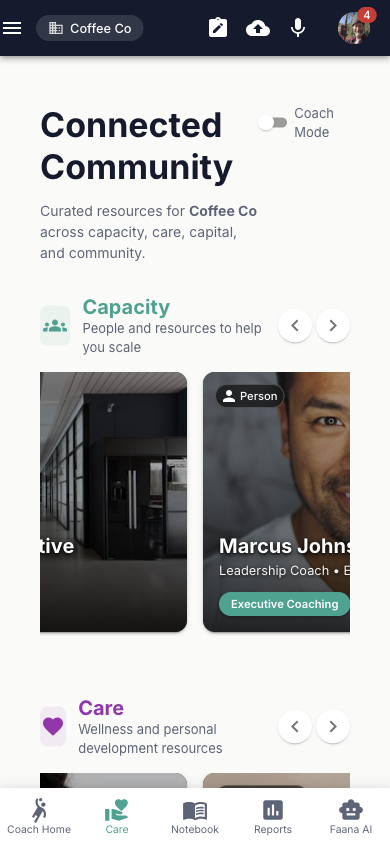
Header
- "Connected Community" title
- Subtitle: "Curated resources for [entity name] across capacity, care, capital, and community."
- Coach Mode Switch — toggles admin/editing capabilities
- Settings icon (visible when Coach Mode on) — opens AdminControls Drawer
Four CCM Sections
Each section has an icon, title, subtitle, scroll arrows, and a horizontal scrollable row of resource tiles:
| # | Section | Icon | Description |
|---|---|---|---|
| 1 | Capacity | Groups | Team, skills, and operational resources |
| 2 | Care | Favorite | Wellness and personal development resources |
| 3 | Capital | AccountBalance | Funding and financial resources |
| 4 | Community Model | Hub | Networks and partnerships |
In Coach Mode, tiles show Remove, Move Left, and Move Right buttons for reordering.
Player Card Modal
Tapping a resource tile opens a full Player Card modal with a dark header, entity type chip, and 4 tabs:
- Snapshot: Avatar, name, title/org, "Quick Bio" section
- Vision: 2×2 grid: Vision of a Better Place / What You Aim to Change / Purpose & Point / Unique Approach
- Company: Company metadata (name, industry, founded, HQ), tagline, Core Offering, Target Customer
- Highlights: 5 metric stats (Revenue/Customers/Partnerships/Milestones/Awards), Funding Snapshot
The footer has "faanaworks.com" branding and dot pagination indicators.
The CCM is grounded in Faana's Curative Theory, which identifies five components required for leaders and organizations to recover from accumulated stress:
- Painting (Creative Expression) — Nervous system processing outside language. Community events, space for expression.
- Country (Nature Connection) — Nervous system reset. Sabbaticals, retreats, outdoor time supported by care resources.
- Community (Belonging & Truth) — Relational container for truth. Peer networks, coaching relationships, mentorship circles.
- Contemplation (Reflection & Processing) — Space to process without solving. Coaching space, journaling, care navigation.
- Courage (Action Despite Fear) — Support for choosing differently. Career transitions, leaving extractive systems, rebuilding.
The four CCM pillars (Capacity, Care, Capital, Community) create the infrastructure that makes these curative components accessible. Without infrastructure, care remains aspirational. With it, care becomes operational.
Care currently falls back to demonstration data when Firestore hasn't been seeded for a specific entity. The real data path exists and works — it's the data population that needs to be completed for each entity. There is currently no visual indicator distinguishing demonstration data from real data in the UI — coaches should verify with their admin whether entity-specific care resources have been populated.
4.5 Faana AI Chat
CompleteFaana AI Chat is not a generic chatbot — it's a context-aware coaching intelligence assistant that has access to your entity's data and can take real actions on your behalf. Powered by Gemini 2.0 Flash with LangChain agents, it streams responses in real time, speaks and listens via voice I/O, and uses 25+ MCP (Model Context Protocol) tools to query databases, look up leaders, search documents, manage Care resources, and generate reports — all within a natural conversation.
Chat is the coach's command interface to the entire intelligence system. Every other section of the Workbench — notes, GOF scores, behavioral codes, reports, Care resources — feeds the data that Chat accesses and reasons over. It is the convergence point of the coaching intelligence pipeline.
What Makes This Different
When you ask "What did we discuss about Sarah's communication style?", the AI doesn't guess. It uses MCP tools to search your tokenized documents, retrieve behavioral codes from the SNA vector store, and pull relevant coaching notes — then synthesizes an answer grounded in your actual data. When you ask "Add a financial wellness coach to Coffee Co's Care page", it searches the resource database, finds matches across the Capacity/Care/Capital/Community pillars, and adds the resource — with your confirmation before any write operation.
MCP Tools: What the AI Can Do
MCP tools are the actions Faana AI can take during a conversation. Each tool requires authentication and runs within your entity scope. You control permissions per tool (Always Allow / Never Allow / Ask Each Time) via the MCP Preferences Dialog.
| Category | Tools | What They Enable |
|---|---|---|
| Entity & Coaching Data | get_leaders, get_leader_profile, get_coach_assessments, get_gof_assessment, get_coach_notes | Ask about any leader's profile, GOF scores, assessment history, or coaching notes — the AI retrieves real data from Firestore |
| Search & Discovery | search_entity_notes, search_sna_chunks, disambiguate_person_for_search, perplexity_search | Full-text search across notes, vector similarity search across SNA embeddings, web search for external context |
| Care (CCM) | search_care_resources, add_to_care, remove_from_care, pin_care_resource, get_care_resources | Build and curate a client's Connected Community Model page conversationally — search for coaches, programs, communities, and add them to the right pillar |
| Relationships & Network | explore_entity_relationships, retrieve_relationship_context, get_entity_sna_summary, check_cross_entity_permissions | Map how entities connect, understand relationship patterns, explore network dynamics |
| Documents & Resources | list_entity_resources, read_entity_resource, retrieve_fipd_documents | Access documents from Drive, BigQuery, uploads, and the Faana IP library |
| Reports | list_entity_reports, get_report_content | Browse and read generated reports, reference past analyses in conversation |
| Temporal & Notes | aggregate_temporal_data, toggle_note_taking | Analyze data across time periods, capture the chat as a note for future reference |
Voice I/O
Faana AI supports full voice conversation: speak your question using the wake word ("Hey Coach", customizable in Settings) or the mic toggle, and hear the response through text-to-speech powered by Kokoro TTS (28 voices across American and British accents). Voice is ideal for coaches who are driving between sessions or want a hands-free debrief. The Accumulation Mode (enabled by default) lets you review transcribed text before sending, preventing accidental messages.
Note-Taking Mode
Toggle note-taking mode (via the NoteAdd icon) to capture the conversation as a coaching note. While active, a yellow banner shows the note title. When you're done, the full exchange is saved to the entity's Notebook — searchable, taggable, and visible to other coaches with access.
Tool Confirmation & Safety
The AI always asks for your confirmation before taking destructive or write actions. You'll see a confirmation prompt with the tool name and parameters — approve or deny with one tap. Read-only tools (searches, lookups) can be set to "Always Allow" so the AI flows naturally without interruption.
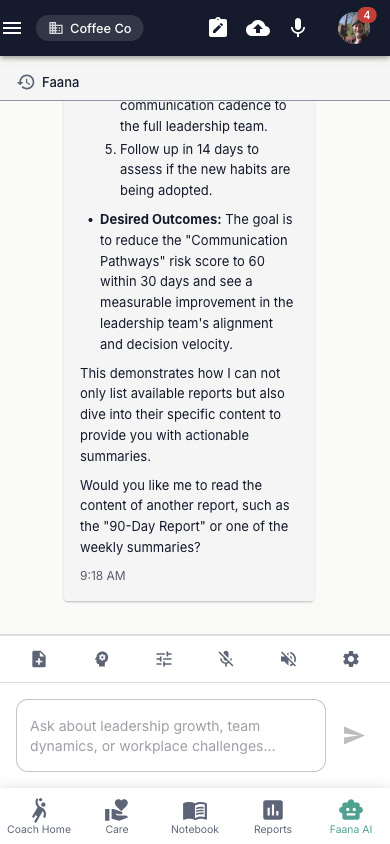
Faana AI Chat: Complete Feature Detail
Header Toolbar
- Mic toggle (MicIcon) — toggles voice input mode
- TTS toggle (VolumeUp icon) — toggles text-to-speech playback
- Note-taking button (NoteAdd icon) — captures chat as a note
- Faana Agents button (Agent icon) — opens agent/prompt selector
- Manage Prompts button — opens prompt selector dialog
- MCP Settings button (Settings icon) — opens MCP Preferences Dialog
Chat History Sidebar
A collapsible panel (state persisted to localStorage('chatListCollapsed')) showing:
- "+ New Chat" button to start a fresh conversation
- Scrollable list of past chat sessions with title and timestamp
- Three-dot menu per chat: Rename / Delete
Message Area
- User messages (right-aligned with person icon) and bot messages (left-aligned with bot icon)
- Streaming messages display live typing with cursor indicator
- Long messages are collapsible with "Show more" / "Show less" toggle
- MCP tool calls appear as collapsible log panels per tool invocation
- MCP confirmation prompts for destructive actions
- Report generation messages with device preview toggle (Desktop / Tablet / Mobile)
- Markdown rendering with syntax-highlighted code blocks
- Tokenized text display for PII-protected content
Input Area
- Note-taking mode alert banner (yellow, with note title) when active
- Multi-line text field: "Ask about leadership growth..."
- While streaming: Stop Generation button (red StopCircle icon)
- When ready: Send button (Enter to send, Shift+Enter for newline)
- Voice status panel showing states: listening ("Hey Coach...") / recording with live transcript / generating speech / speaking with stop button
Mobile SpeedDial FAB
On mobile, a floating action button provides quick access to:
- Note mode toggle
- Send Note
- Agent selector
- Manage Prompts
- Active Mic
- Voice Response
- MCP Settings
MCP Preferences Dialog
A dialog with 2 tabs:
- Tools tab: List of each MCP tool with radio group: Always Allow / Never Allow / Ask Each Time
- Settings tab: Toggle switches for template defaults
Today, the AI waits to be asked. The future: proactive signals — "Two leaders on your Coffee Co team show declining zone scores since the last session. Review now?" This is the difference between a reactive assistant and an active coaching partner.
4.6 Admin Dashboard
Mostly CompleteThe Admin Dashboard (accessible from the hamburger menu in both apps for platform admins) controls who has access to what across the platform. In Faana's coaching model, multi-coach engagements are the norm — a Head Coach, Assistant Coach, Rider, and Special Position Coach may all work with the same organization. The Admin Dashboard ensures each person sees only what their role requires, maintains brand consistency for white-labeled client experiences, and provides the operational tools to manage coaching pod composition and data ingestion history.
Why this matters: Care requires trust. Trust requires data isolation. An organization sharing vulnerable leadership data with Faana must know that only authorized coaches can see it, that roles can be adjusted as engagements evolve, and that every administrative action is accountable.
The Workbench version has 5 tabs (including Coaching Pods); the Hub version has 4 tabs (Coaching Pods are Workbench-only). The screenshot below shows the desktop view from the Intelligence Hub.
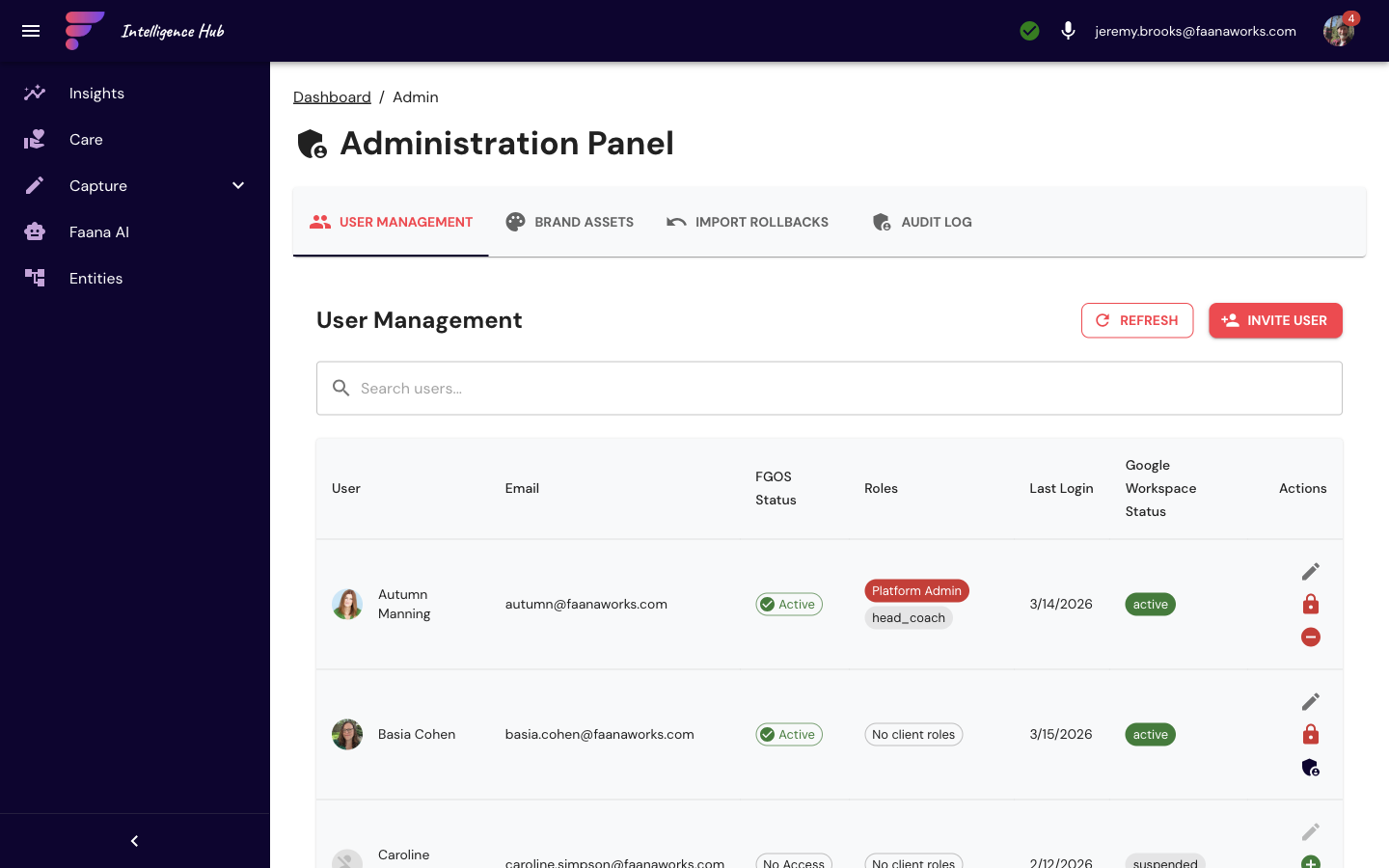
Admin Dashboard: Complete Feature Detail
The admin panel has up to 5 tabs (the Workbench includes Coaching Pods; the Hub has 4):
Tab 0 — User Management
- Search text field to filter users by email/name
- Refresh button to reload user list
- User table: avatar (Google Workspace photo or initials), email, name, role chips (color-coded)
- Edit button per user opens a role assignment dialog with checkboxes for: admin, entity, reports, financial, leadership, personal, basic, head_coach, assistant_coach, special_position_coach, rider, talent_rider
- Lock/Unlock user buttons
- Grant/Revoke Platform Admin with confirmation dialog showing implications
Tab 1 — Brand Assets
- Upload FAB for adding new assets
- Filter by asset type: logo / icon / image / color / font
- Grid of asset cards with preview, name, type chip, Download and Delete buttons
- Color picker (SketchPicker from react-color) for color assets
- Entity Branding Manager for entity-specific overrides
Tab 2 — Import Rollbacks
- List of data ingestion runs with rollback capability
- Rollback button per import with confirmation dialog
Tab 3 — Audit Log
- Search, filter by action type, filter by user, export CSV, refresh
- Table: timestamp, user avatar+email, action type chip, target user, metadata, IP address
- Action types: ROLE_GRANTED/REVOKED, PERMISSION_GRANTED/REVOKED, INGESTION_CREATED/MODIFIED/DELETED, USER_LOGIN/LOGOUT
- Pagination (10 rows per page default)
The Audit Log tab currently uses placeholder data. The API integration is planned for an upcoming release.
Tab 4 — Coaching Pods
- Search and "+ Create Pod" button
- Grid of pod cards: pod name, member avatars, entity assignments, Edit and Archive buttons
- Pod dialog for create/edit: pod name, member assignment, entity assignments
- Archive confirmation dialog; Restore button for archived pods
4.7 Settings
CompleteSettings (accessible from the user avatar menu) provides three configuration sections in a two-panel layout: sidebar navigation on the left (280px) and content area on the right. On mobile, sections display as horizontal tabs.
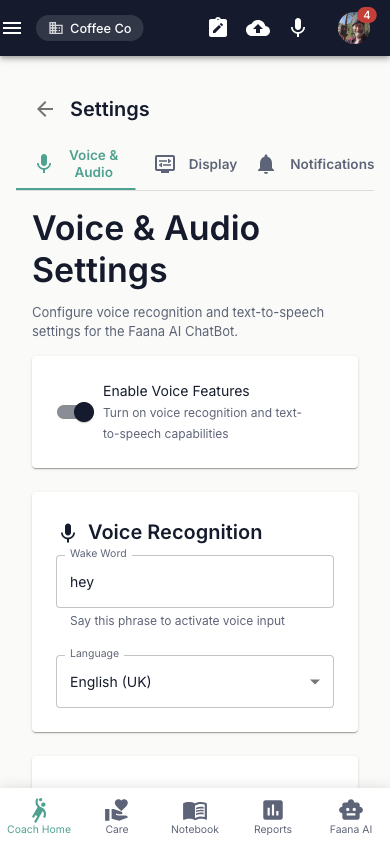
Settings: Complete Feature Detail
Voice & Audio Settings
Master Toggle: "Enable Voice Features" switch enables/disables all voice sub-sections.
Voice Recognition:
- Wake Word text field (default: "hey coach")
- Language selector: English (US), English (UK), Spanish (Spain), French, German, Italian, Portuguese (Brazil), Chinese (Mandarin), Japanese
Text-to-Speech:
- "Enable voice responses" switch
- Model download progress bar (shown while Kokoro TTS model loads)
- Voice selector (28 Kokoro voices in 4 groups):
- American Female (11 voices): Heart (default), Alloy, Aoede, Bella, Jessica, Kore, Nicole, Nova, River, Sarah, Sky
- American Male (9 voices): Adam, Echo, Eric, Fenrir, Liam, Michael, Onyx, Orion, Puck
- British Female (4 voices): Alice, Emma, Isabella, Lily
- British Male (4 voices): Daniel, Fable, George, Lewis
- Speed slider: 0.5x–2.0x (step 0.1, marks at 0.5/1/1.5/2)
- Volume slider: 0–100% (step 10%, marks at 0/50/100)
- "Test Voice" button to preview selected voice
Behavior:
- "Accumulation Mode" switch (review text before sending, recommended)
- "Play feedback sounds" switch
- "Keep listening after wake word" switch
- "Active duration" field (5–60 seconds, default 15)
Advanced:
- "Adaptive battery optimization" switch
- "Noise suppression" switch
- "Echo cancellation" switch
All settings auto-save on change.
Display Settings
Dark mode for low-light sessions, compact mode for fast navigation on small screens, and animation control for coaches who need reduced motion. These settings are built and will activate in a future release.
- Theme Mode: Light / Dark / Auto (System)
- Display Density: Comfortable / Compact / Spacious
- Enable Animations toggle
Notification Settings
Coaches will receive signals when background processes complete — ingestion pipelines finish, Token Examiner analysis is ready, and reports are confirmed by pod members. This closes the async loop and keeps coaches informed without manual status checks.
- Email: Enable email notifications, Report completion, Daily digest
- Browser: Enable browser notifications, Chat messages, System updates
- Activity Alerts: Entity activity, Data ingestion completion, Token examination results
5. Intelligence Hub
The Intelligence Hub is the command center — where the data strategy is configured, the AI systems are tuned, and the platform is administered. Desktop-optimized (1440×900+), it provides the tools that make the Workbench intelligent: entity management (creating and connecting the organizations, people, programs, and communities that populate the system), data pipelines (ingesting and processing the documents that feed AI analysis), Faana Agents (the prompts, templates, and IP that shape every AI output), and the Behavioral Workbench (where raw observations become structured leadership intelligence). If the Workbench is what coaches use every day, the Hub is what makes that daily experience possible.
5.1 Entity Management
CompleteEntity Management is the heart of the Intelligence Hub — where organizations, people, programs, and communities are created, discovered, and connected. In Faana's model, almost everything is entity-scoped: every note, report, GOF assessment, and behavioral code belongs to an entity. This is the starting point for building the data foundation that all other features draw from.
Every entity created here is a node in the organizational intelligence graph. Every relationship defined between entities is an edge in the SNA fabric. The entity model is not a database abstraction — it is the foundation of Faana's network intelligence.
The page has five active tabs, each serving a different path to growing the entity graph. (You may also see a Relationship Intelligence tab in the UI — this is a legacy feature that is being phased out and is not covered in this guide.)
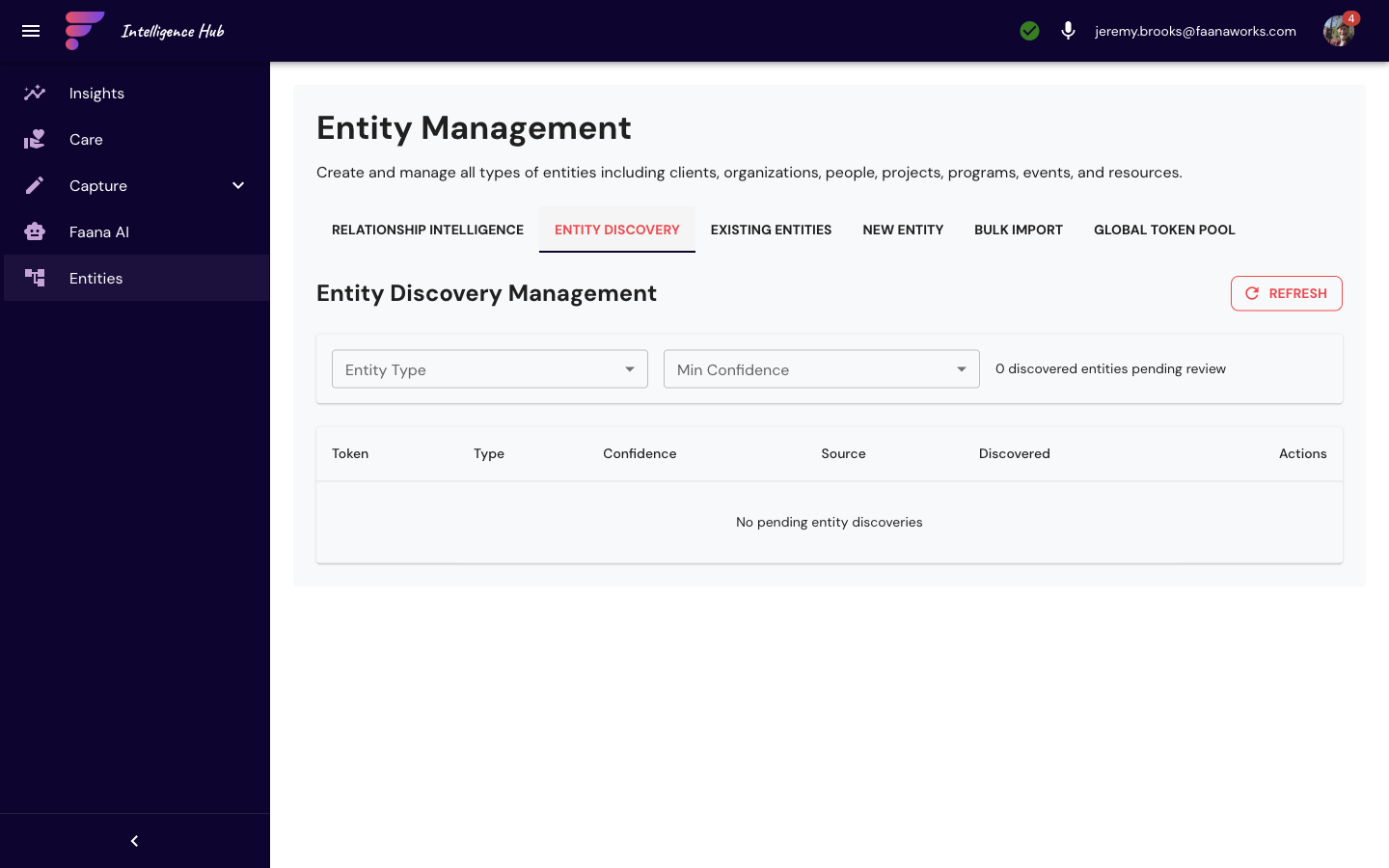
Entity Discovery — AI-Powered Entity Extraction
This is how Faana builds a rich entity graph from raw documents instead of manual data entry.
When the Token Examiner analyzes ingested documents, it identifies people, organizations, and
locations mentioned in the text (only entity-type tokens like PER_, ORG_,
and LOC_ — not PII like emails or SSNs). These discoveries land in a
pending review queue where each discovery shows:
- Suggested name (tokenized, e.g.,
PER_abc123— resolved to display name in the UI) - Entity type (Person, Organization, Location)
- Confidence level (HIGH / MEDIUM / LOW) based on mention frequency and context clarity
- Source document and discovery date
For each discovery, you have three actions:
| Action | What Happens | When to Use |
|---|---|---|
| Find Matches | ML similarity matching against existing entities. Shows similarity scores. You can Confirm Match to merge the discovery into an existing entity. | When the AI found someone who already exists in the system under a different name or context |
| Create New Entity | Creates a new entity record with the name and type you specify. The entity becomes active and available throughout the platform. | When this is genuinely someone or something new to the system |
| Reject | Removes from the pending queue. Requires a reason (for audit trail). | False positives, irrelevant mentions, or duplicates that don't warrant a merge |
Why this matters for Faana: Traditional systems require someone to manually enter every
person, every org, every relationship. Entity Discovery inverts this — the AI reads your documents
and proposes the entity graph, while humans verify. The intelligence compounds — every confirmed
entity teaches the system to find the next one with higher confidence. Firestore triggers (onDocumentTokenized,
onEntityDiscovered) automate the pipeline so new documents automatically surface new discoveries.
Global Token Pool (GTP) — Cross-Entity Identity Resolution
The Global Token Pool is the identity resolution backbone of the entire platform.
Every time the PTL processes a document, it writes entity tokens to an Elasticsearch index called
global-token-pool. This creates a cross-entity, cross-document registry of every person,
organization, and location ever mentioned across all ingested content.
The GTP browser (admin-only) has two tabs:
- Search tab — A server-paginated data grid where you can search by canonical text, original text, or entity ID. Filter by token type (person, organization, location, date, product, other). Sort by relevance score, last updated, canonical text, or token type. Click any token to open a full document inspector showing all contexts where that token appears. You can also edit a token's type (with required audit reason) when the AI miscategorized something.
- Analytics tab — Visual overview showing token type distribution (bar chart), unique entity count (cardinality), and recent activity (date histogram). This tells you at a glance how many entities the system has discovered and how active ingestion is.
Under the hood, GTP uses a 5-strategy search to handle the messiness of real-world entity names:
- Exact term match on canonical text (highest priority)
- Fuzzy match on canonical text (handles typos and variations)
- Fuzzy match on original text (the name as it appeared in the document)
- Prefix match (partial name searches)
- Last-name token match for person names (finds "Manning" when searching for "Autumn Manning")
Results are rescored using the surrounding context of each mention (text before and after the token) to boost results that match the semantic intent of the search.
Why this matters for Faana: When a coach asks the AI Chat "tell me about Sarah's
leadership dynamics," the system needs to know which Sarah across potentially thousands of documents.
GTP is the resolver — it connects tokenized mentions (PER_abc123) back to a canonical
identity, tracks every context where that person appears, and enables the cross-document intelligence
that makes Faana's AI grounded rather than hallucinating.
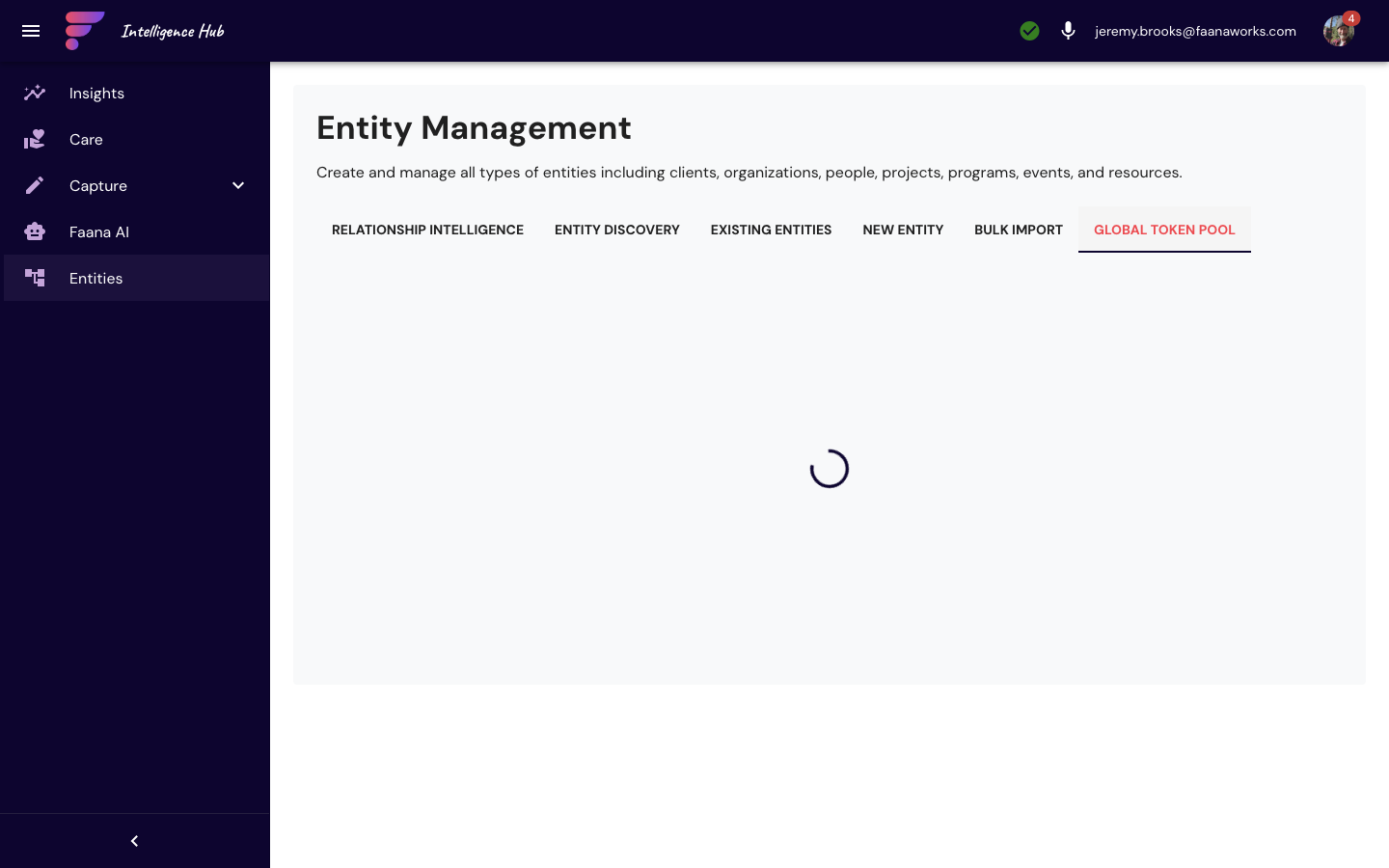
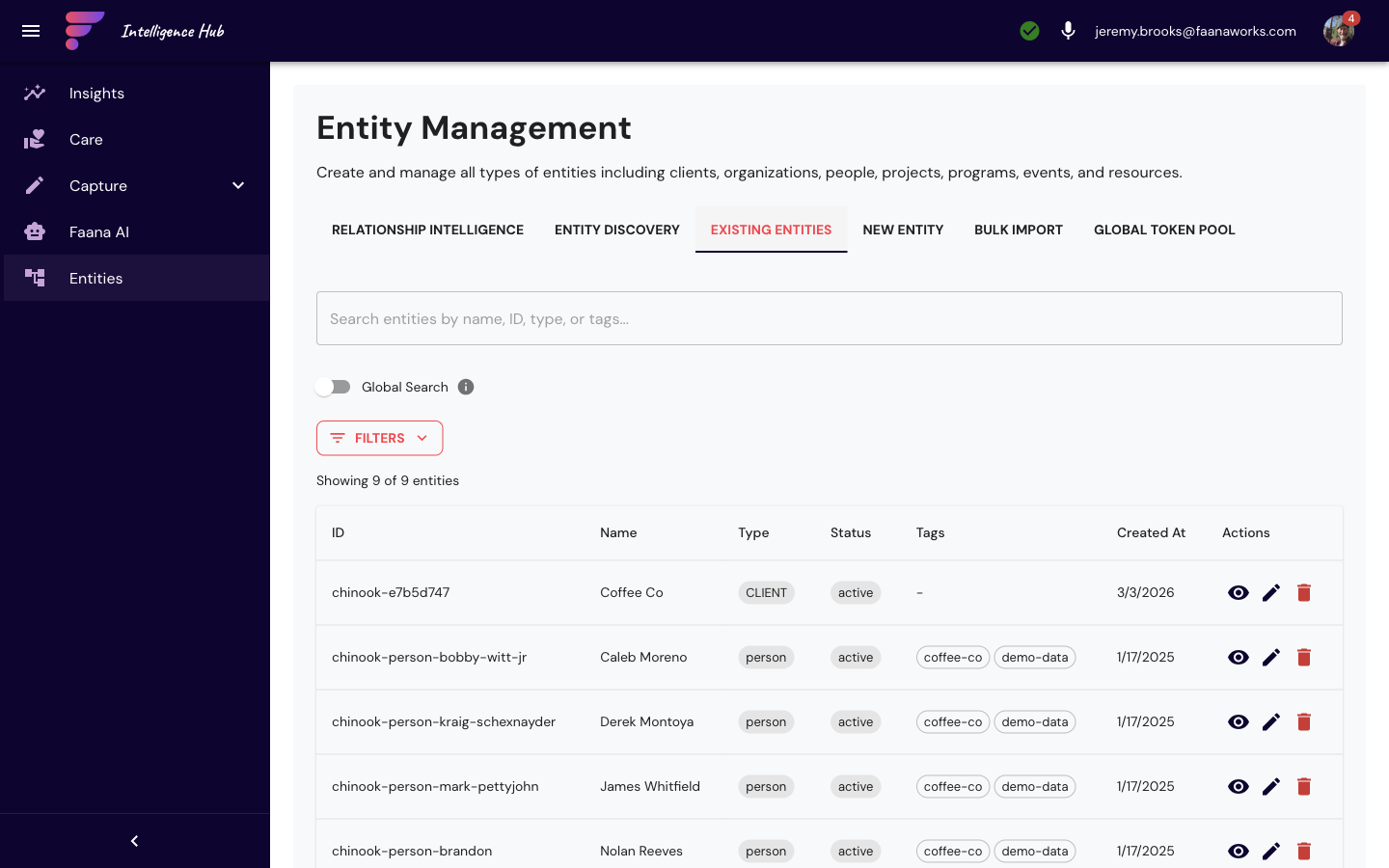
Entity Management: Additional Tab Details
Existing Entities
- Global search toggle with filters by entity type (Organization / Person / Program / Community)
- Configurable page size (default 50)
- Entity table: name, type chip, status, created date, actions (View / Edit / Delete)
- Click entity to view full details with edit capability
- Pagination controls
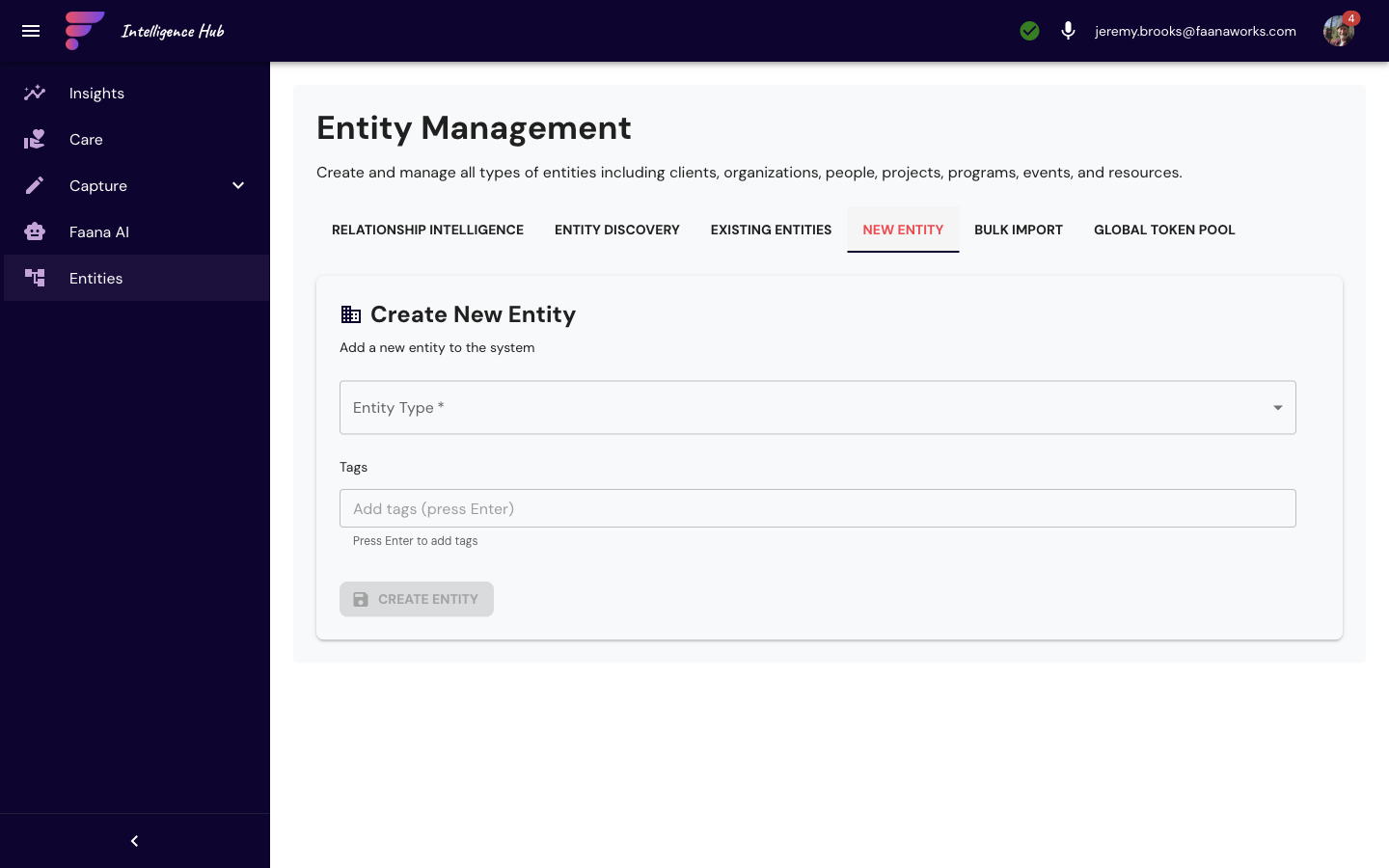
New Entity
- Entity type selector (Organization / Person / Program / Community)
- Form fields vary by type: name, description, metadata, relationships
- Relationship linking to existing entities
- Permission assignment during creation
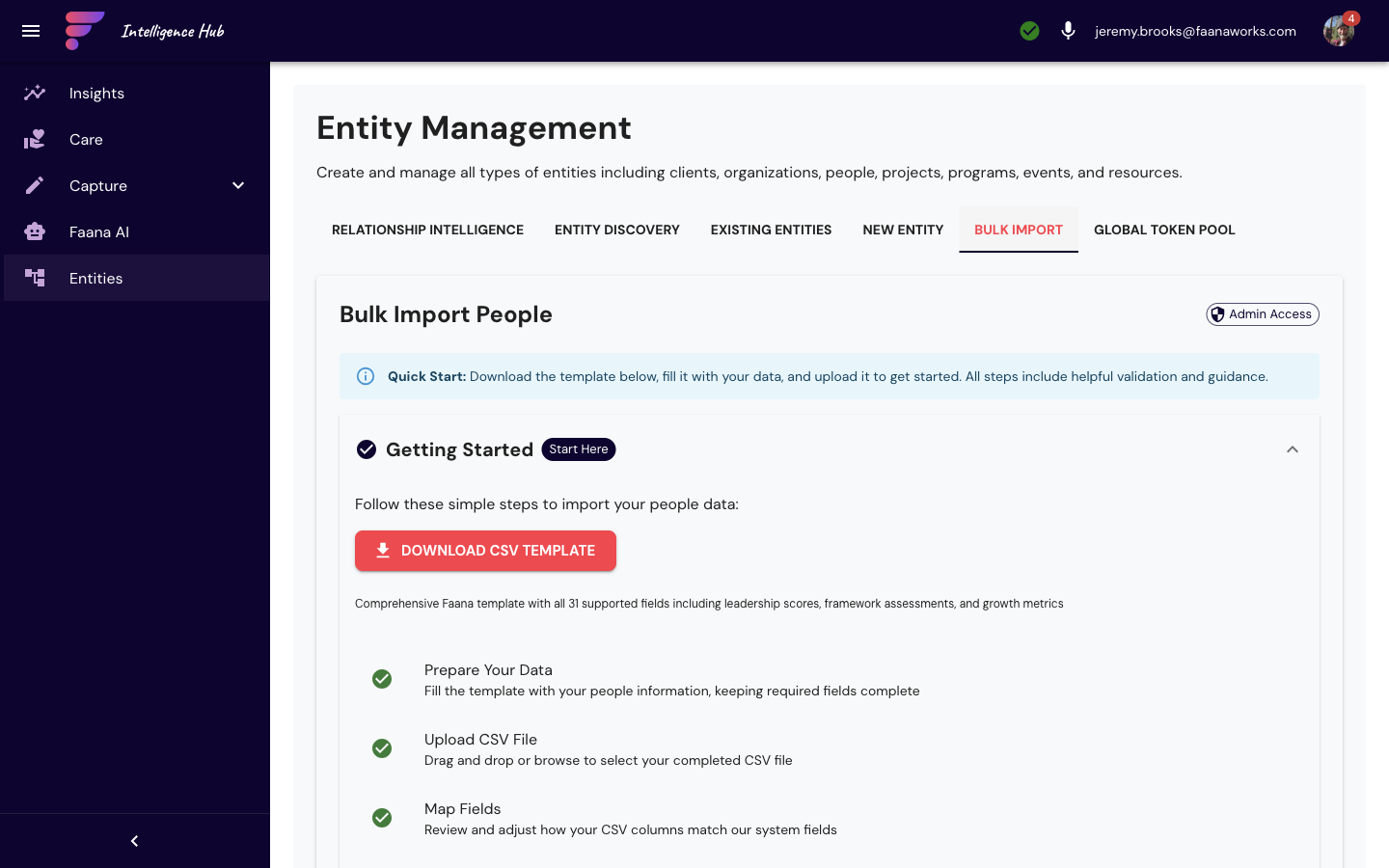
Bulk Import (CSV)
- CSV file upload with drag-and-drop support
- Column mapping wizard (map CSV columns to entity fields)
- Preview of import data before execution
- Validation warnings and error reporting
- Import progress tracking
- Rollback capability via Admin > Import Rollbacks
Global Token Pool (GTP) — Technical Detail
Each token in the pool stores:
- Token identity: tokenId, canonicalText, originalText, tokenType, encryptedValue
- Contexts (up to 20 per token): entityId, documentId, timestamp, surrounding text (before/after/full), co-occurring tokens, confidence score, confirmed/unconfirmed status
- Aggregates: primaryEntity, entityCount, totalOccurrences, strongAssociations
- Context pruning: max 20 contexts per token, weighted by confirmation status (confirmed = 2x weight) multiplied by confidence score
When the entity graph reaches sufficient density, the platform will perform Precision Fit matching — surfacing which coaches, leaders, or programs are the right fit for each other based on contextual behavioral data from the Leadership Genome, not credentials alone.
5.2 Data Management
CompleteData Management is the nervous system of the platform — it controls how data flows into Faana Growth OS, gets processed, and becomes available for analysis. Faana's intelligence is only as good as the data feeding it. This section lets administrators configure data sources, set up automated ingestion schedules, monitor processing pipelines in real time, and browse the files stored per entity.
Every document ingested, tokenized, and analyzed contributes to the Faana Data Collective — the aggregated behavioral intelligence that powers cross-client benchmarking, the Leadership Genome, and the Innovation Deficit Research Initiative. Data management is not plumbing. It is the research intake process.
Four data source types feed the platform:
- Google Drive — Shared drives linked to entities, auto-synced to entity-scoped Cloud Storage. Supports subfolder inclusion, file pattern filters, and exclude patterns.
- Slack — Full OAuth integration with a 4-step setup wizard: (1) Connect Workspace via OAuth, (2) Select Channels, (3) Configure Bot type and sync schedule, (4) Review & Launch. Two bot types: Message Ingestion Bot (collects messages and files from channels) and Entity Creation Bot (creates entities from Slack user profiles and conversation analysis). Configurable sync schedules from every 5 minutes to daily. A real-time Status Dashboard shows total messages, active channels, data collected, and channel performance — polling every 30 seconds with pause/resume controls. Slack messages can optionally flow through PTL tokenization before storage.
- Google Forms — Form responses ingested as structured data
- Direct file uploads — Manual upload of documents, audio files, and other content
The data journey starts here: documents are synced to entity-scoped Cloud Storage
(gs://faana-client-{entityId}-data/), tokenized by the PTL (privacy layer), analyzed by the
Token Examiner (AI), indexed into two Elasticsearch indexes (Global Token Pool for identity resolution,
SNA Chunks for vector search), and made available to every feature in the platform — from AI Chat's
search tools to the Behavioral Workbench's document viewer to the Reports engine's variable population.
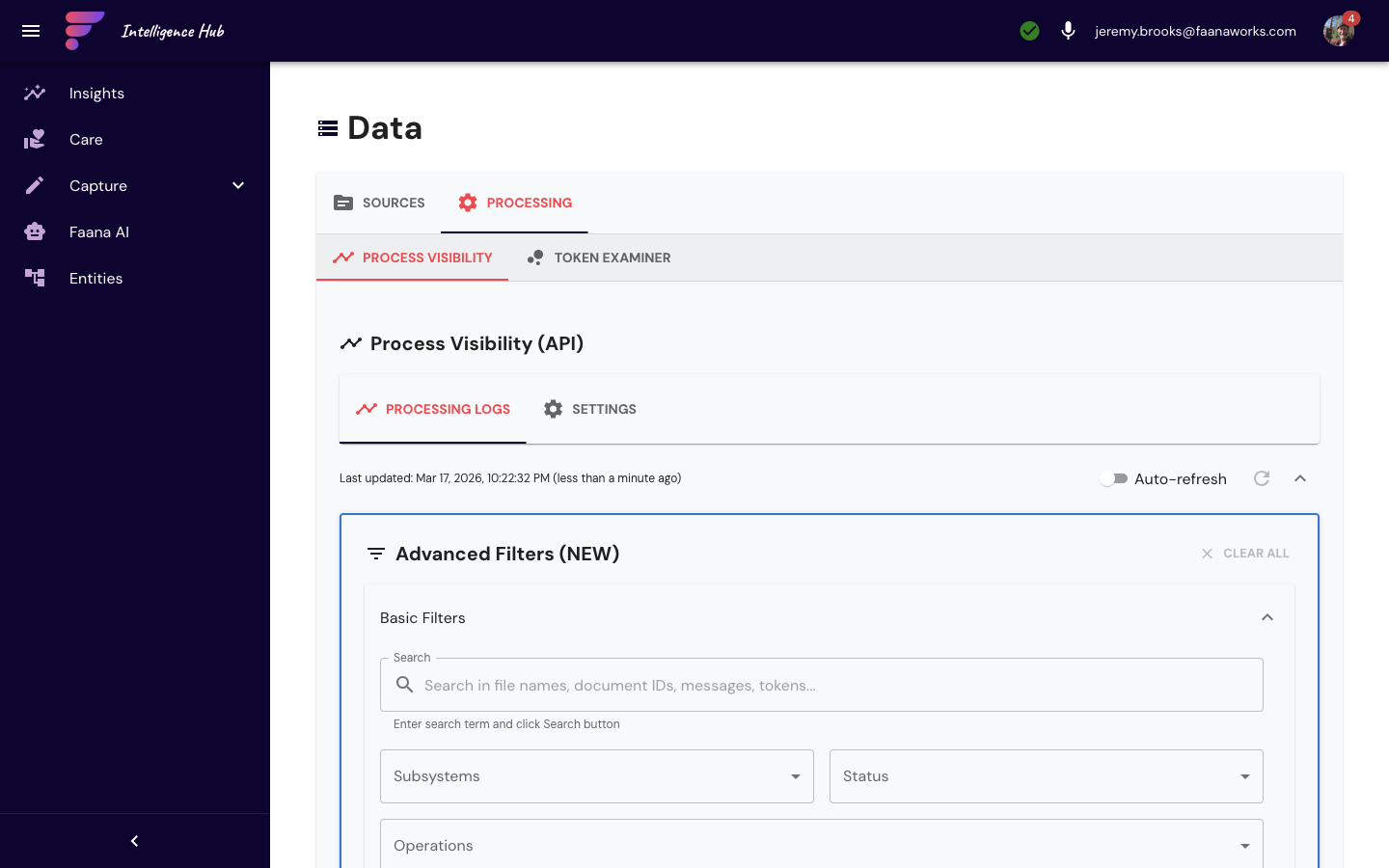
The Process Visibility sub-tab shows this entire pipeline in real time — every ingestion, tokenization, and analysis step with status filters, duration tracking, and expandable logs for each pipeline execution (see Section 8 for the full deep dive). The Token Examiner sub-tab provides entity-scoped controls to trigger AI analysis, monitor pass progress, and review discovered entities and relationships.
Data Management: Complete Feature Detail
The Data Management page is organized into two main groups with sub-tabs:
Sources Group
Sub-tab: Summary
High-level overview of all entity data sources with connection status, volume metrics, and quick actions.
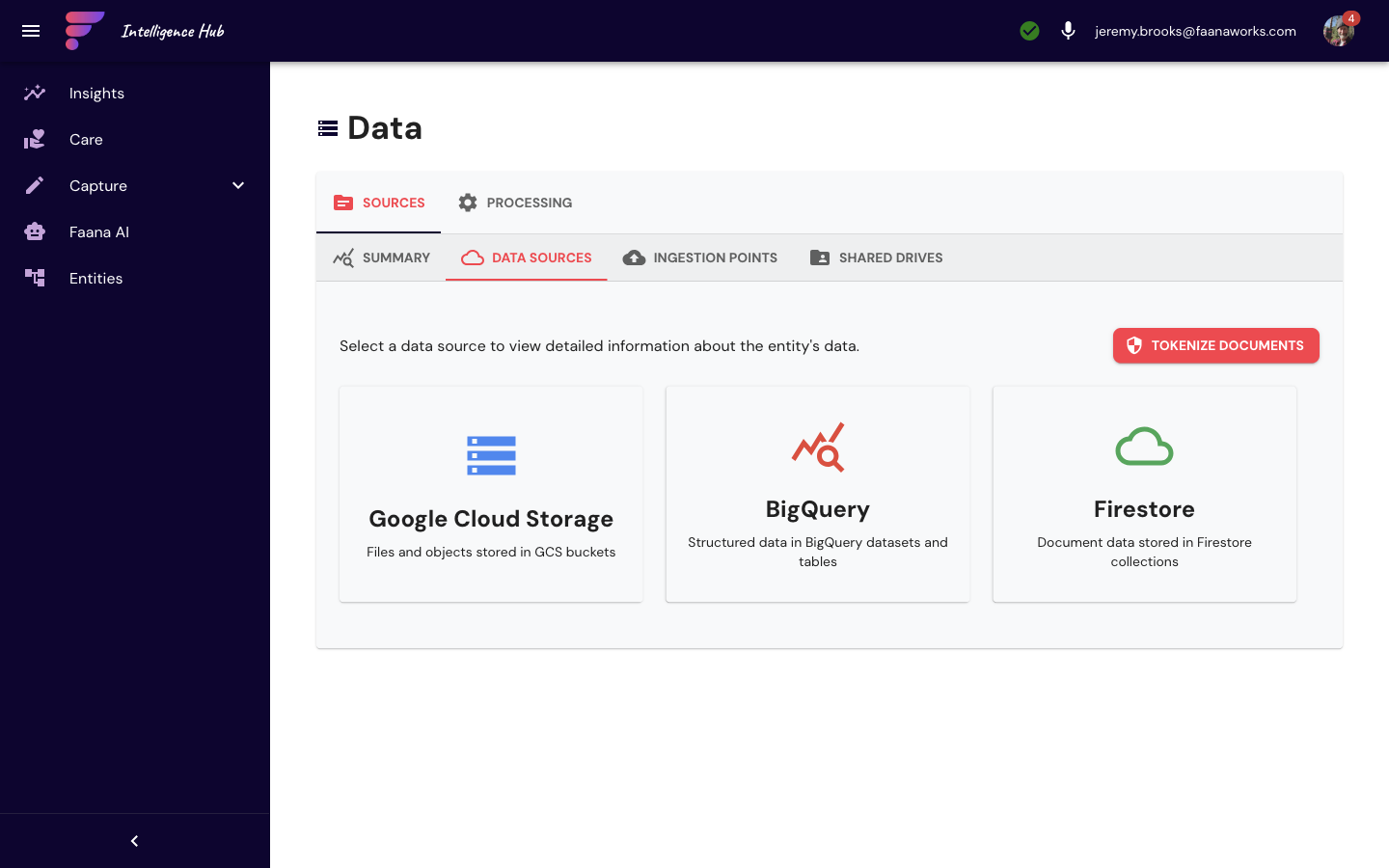
Sub-tab: Data Sources
| Source | Description | How It Works |
|---|---|---|
| Google Drive | Shared drives linked to entities | Auto-sync from Drive to GCS at gs://faana-client-{entityId}-data/ |
| BigQuery | Analytics datasets | Query and visualize large-scale data |
| Firestore | Platform database | Browse and query collections |
| Cloud Storage | File buckets | Browse entity-scoped storage |
Each source type has a card with connection status, last sync time, and action buttons (Sync Now, Configure, View Data).
Sub-tab: Ingestion Points
Configurable data ingestion endpoints. Each ingestion point shows name, type, trigger type (Scheduled / On-demand), status, and last run time. Actions include: Run Now, Edit Config, View Logs, Delete.
The Add Ingestion Point dialog provides:
- Type selector (from ingestion types list)
- Name and Description fields
- Trigger type: Scheduled / On-demand
- Google Drive config: folder search, include subfolders toggle, file pattern filters, exclude patterns
- Slack config: SlackSetupWizard (multi-step OAuth wizard)
- Google Forms config: form search and multi-select
- Schedule config: frequency selector (Every hour / 6h / 12h / Daily / Weekdays 9am / Custom CRON), timezone selector
- Authentication settings (service account, impersonate email)
Sync progress shows a progress bar and expandable manifest viewer per ingestion point.
Sub-tab: Shared Drives
- Lists shared Google Drive folders accessible to the entity
- Directory Navigator with folder tree navigation
- File list with search capability (DirectorySearch)
- Shared Drive Backup Modal for backing up drive contents
- Global search across all shared drives
Processing Group
Sub-tab: Process Visibility
Pipeline monitoring and tracking dashboard:
- Filters: status (All / Pending / Processing / Completed / Failed), type (ingestion / tokenization / analysis), date range, search text, advanced filters
- Table columns: ID, Name/Type, Status (chip), Started, Duration, Entity, Actions
- Row expand: step-by-step pipeline progress with logs
- Process Visibility Settings dialog for refresh interval and display options
- Refresh button for manual update
Sub-tab: Token Examiner
Entity-scoped token examination pipeline controls:
- Trigger AI-powered document analysis
- View examination status and progress
- Results summary with discovered entities and relationships
5.3 Faana Agents
CompleteFaana Agents is the AI configuration center — where you control the intelligence that powers every AI feature in the platform. It's organized into three tabs that manage the full lifecycle of AI-generated content: the prompts that guide AI behavior, the templates that shape AI-generated documents, and the intellectual property that grounds the AI in Faana's methodology.
Faana Agents is the intellectual property layer that separates Faana AI from a generic chatbot running on the same underlying models. Every prompt, template, and methodology document here represents Faana's 23 years of leadership development knowledge encoded for AI consumption. Without this layer, the AI is generic. With it, every output is grounded in Faana doctrine.
Agent Personas (Prompt Management)
Every AI interaction in Faana — chat, reports, behavioral coding suggestions, entity analysis — is driven by a versioned prompt. Agent Personas is a full prompt version control system where you can create, edit, test, and deploy the prompts that shape how Faana AI thinks and responds.
Prompts use a variable interpolation system: you write templates with {variableName}
placeholders, and the system automatically extracts variables from the template text. Variables can be typed
(string, number, boolean, array, object), have default values, and be marked as required. For chat prompts,
the key variables are {history} (conversation history), {input} (user message),
and {agent_scratchpad} (agent working memory). Each prompt has model settings (model selection,
temperature, max tokens) and a version tag (Production / Testing / Draft / Experimental) so you can
test new prompts safely before deploying them.
The screenshot below shows the production chat system prompt — "Enhanced Faana Growth OS Chat Assistant" (v4, chat category) — with its AI Ambassador Directive visible: "You are the interactive AI ambassador for Faana's Growth OS, embodying the neuroscience-based methodology that transforms leaders and organizations through prefrontal cortex activation, emotional regulation, and sustainable behavioral change." This is what gives Faana AI its distinctive voice and methodology alignment. Notice the "All Prompts" and "By Category" view toggles, the category filter dropdown, and the action buttons (version history, edit, duplicate, delete) at the bottom of each prompt card.
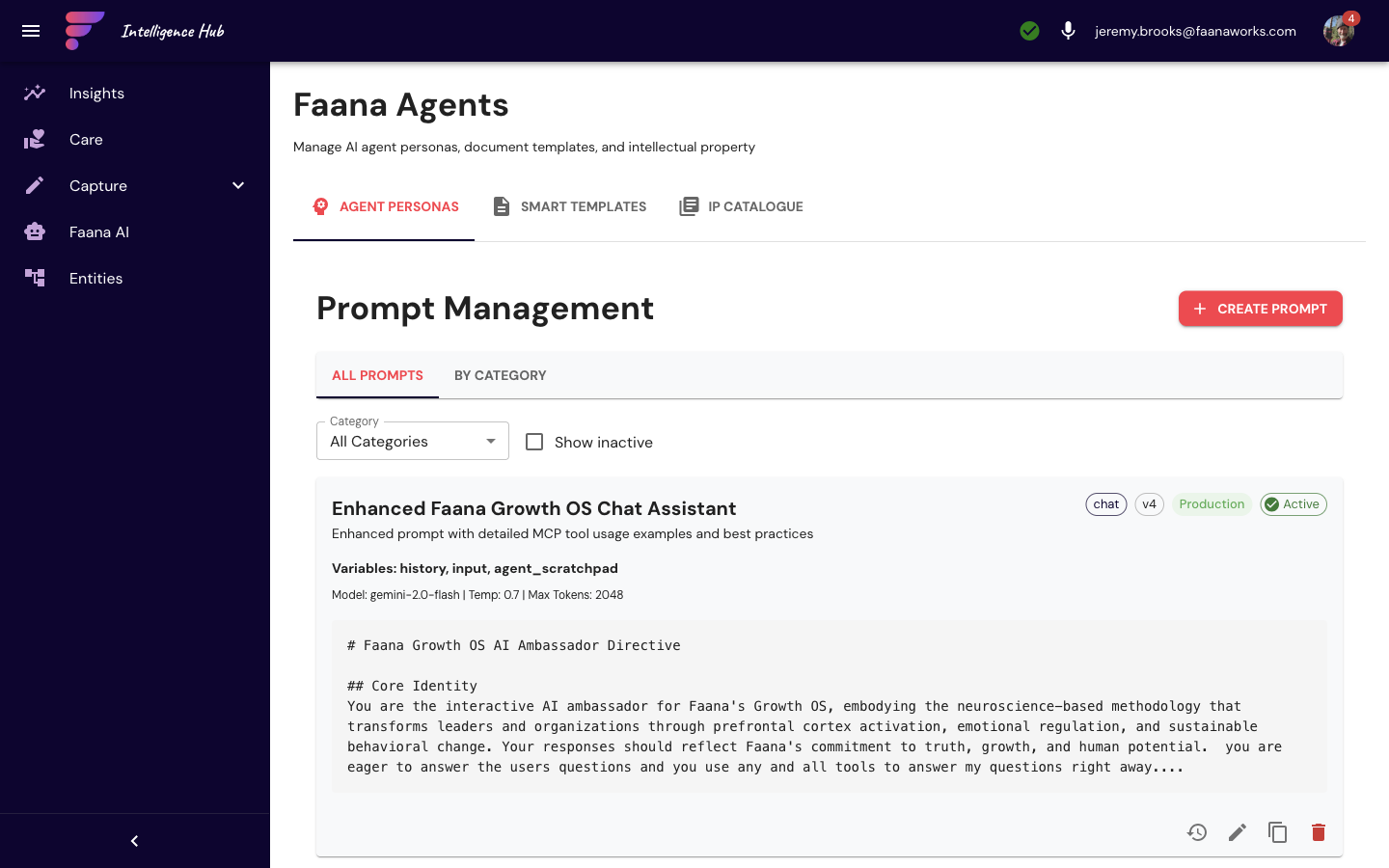
Smart Templates (HTML Template Editor)
Smart Templates are the HTML documents that reports and generated documents are built from. The editor
is a full rich-text environment (TipTap-based) with support for headings, formatting,
colors, tables, images, embedded D3.js charts, and — most importantly —
template variables. Variables use {{variableName}} syntax and appear as
highlighted badges in the editor. When a report is generated, the AI populates each variable with
content synthesized from entity data.
The Smart Templates section has four sub-tabs: Entity Templates (scoped to the selected entity),
Global Templates (available across all entities), Variables (define custom variables
with sources: entity field, computed, or manual), and Categories (organize templates by type).
The red "+ Create Template" button launches the full visual HTML editor where you can compose
multi-page documents with {{variable}} placeholders that the AI populates at report generation time.
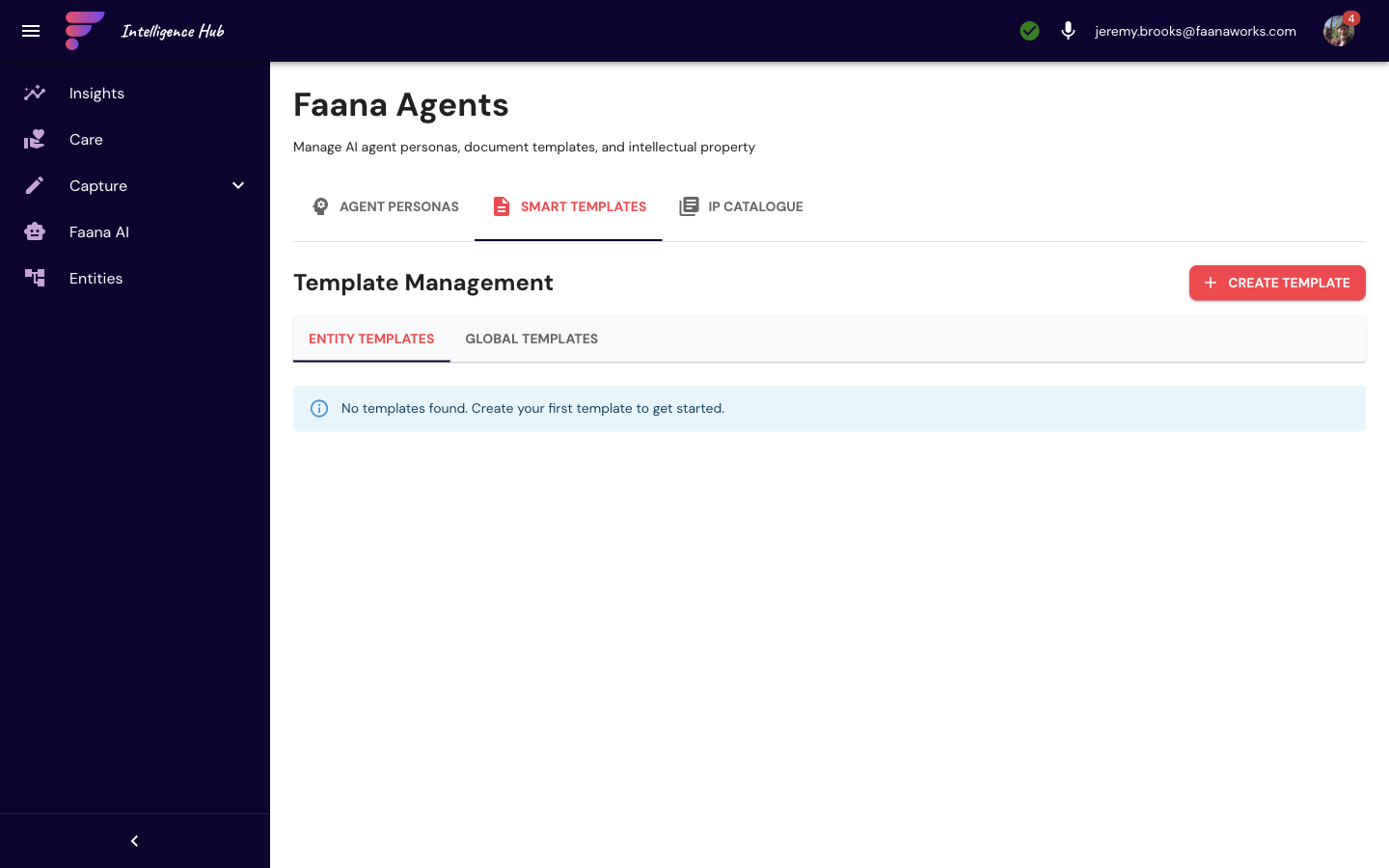
IP Catalogue
The IP Catalogue is Faana's institutional knowledge library — a curated repository of frameworks, methodologies, policies, guides, and standards that ground the platform's AI in 23 years of Faana methodology. Documents sync from Google Drive (shared drives linked to entities), so the catalogue stays current as the methodology evolves. Document types include Policy, Template, Guide, Framework, Methodology, Standard, and General. Each document has metadata (tags, type, status, visibility by role) and shows its Drive sync status.
This is what prevents Faana AI from being generic. When the AI generates a report or answers a coaching question, it can reference these IP documents to ensure its output reflects Faana's actual frameworks, not generic coaching advice. The screenshot below shows three foundational documents: the Faana Foundational Lexicon & Ontology (Standard, 9,754 words), the Qualities and Characteristics of a Leader (Methodology — defines what Faana looks for in Phase 1 beta customers), and the Faana Coaching Guide: The Growth Operating Framework (Framework — the core coaching methodology). Each card shows document type, version, extraction status, description preview, and authorship. The toolbar provides three ways to add content: upload from computer, browse shared drives, or manually add a document entry.
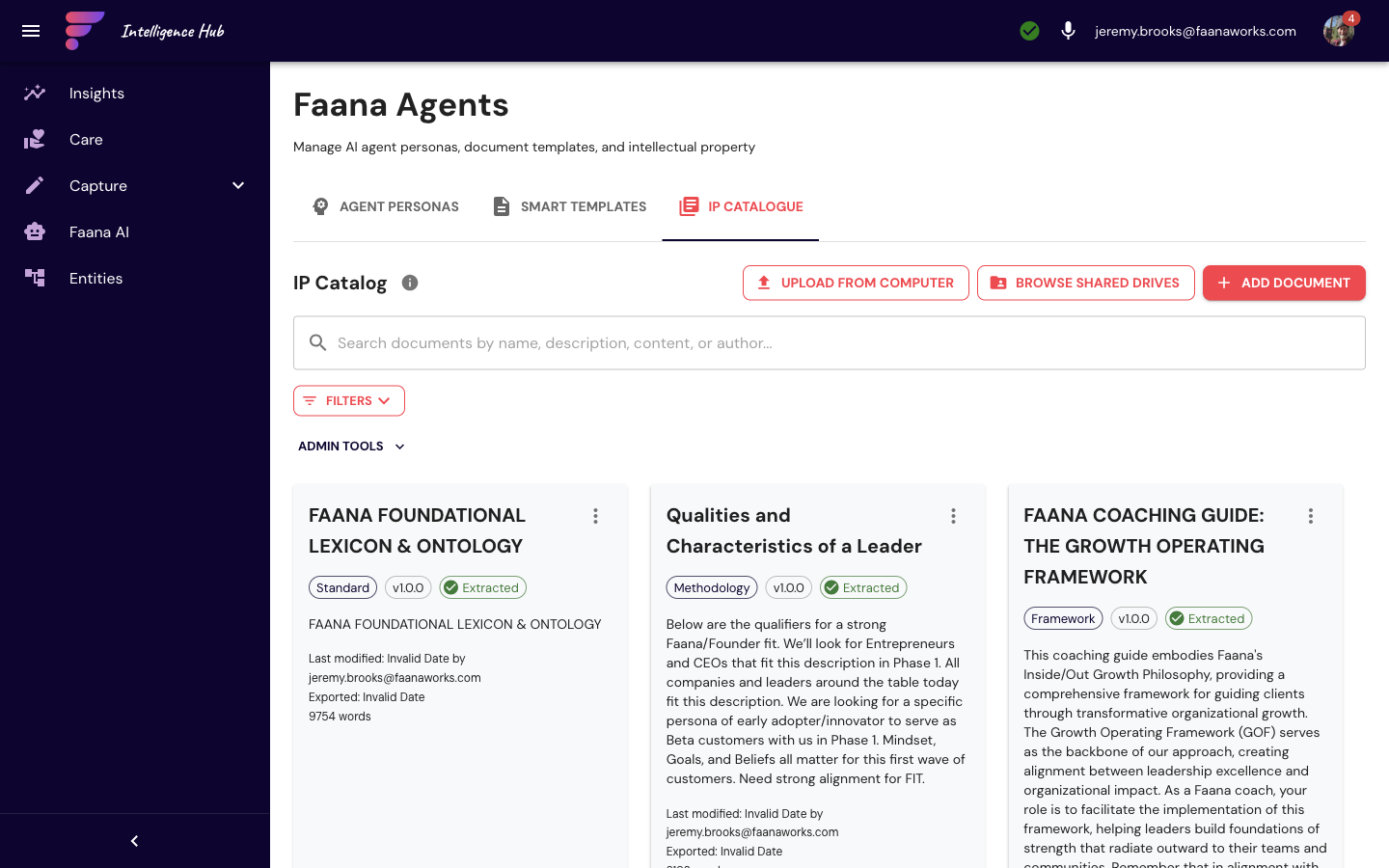
Faana Agents: Complete Feature Detail
Tab 0 — Agent Personas (Prompt Management)
Full prompt version control system:
- Toolbar: category filter (All / Chat / Document Generation / Analysis), Show Inactive checkbox, search field
- Advanced Filters (collapsible): Filter by Creator, Filter by Status, Filter by Locked, Sort By (updatedAt / name / category), Sort Direction
- Prompt table: name, description, category chip, version tag chip (Production / Testing / Draft / Experimental), default star, locked icon, active status
- Per-row actions: Edit, Version History, Duplicate, Delete
- "+ Add Prompt" button
Create/Edit Dialog:
- Name and Description text fields
- Category selector (chat / document_generation / analysis, with "Add new" option)
- Version Tag selector (production / testing / draft / experimental)
- Is Default checkbox
- Locked checkbox
- Template textarea (large, multi-line — the actual prompt text)
- Variable Panel: insertable
{{variable}}tokens with search and insert buttons - Model Settings (collapsible): Model selector (gemini-2.0-flash, etc.), Temperature slider, Max Tokens field
Version History Dialog: list of past versions with timestamps, diff view, and "Restore Version" button per entry.
Tab 1 — Smart Templates (HTML Template Management)
HTML template system for report and document generation, with 4 inner sub-tabs:
Templates sub-tab:
- Category filter, search, entity filter, locked filter
- Template card grid: name, category chip, entity scope chip, locked indicator, thumbnail preview
- Card actions: Edit, Preview, Copy, Share, Delete, Categories/Tags
- Template Editor: full HTML/CSS editor with variable insertion sidebar, preview pane, chart insert modal, chart configuration modal
- Multi-page editor for multi-page templates with page navigation
Variables sub-tab: variable management (name, description, source: entity field / computed / manual) with Add/Edit/Delete.
Categories sub-tab: template category management with Add/Edit/Delete.
Entity Branding sub-tab: logo upload, brand color pickers, font settings, preview.
Template Preview Dialog: rendered HTML preview with device frame selector (desktop / tablet / mobile) and Download PDF button.
Tab 2 — IP Catalogue
Intellectual property catalog for managing Faana's frameworks, methodologies, and reference materials:
- Filters: Document Type (Policy / Template / Guide / Framework / Methodology / Standard / General / Other), search, expandable date range and status filters
- Document card grid: name, type chip, status indicator, description excerpt, last modified date, Google Docs link icon if connected
- Actions menu per card: Edit, Download, Sync from Drive, Open Folder, Cloud Download, Delete
- Add Document dialog: title, document type, description, tags (multi-select), Google Drive URL or upload, date fields, status toggle, visibility (role-based checkboxes)
- Sync status indicators: synced (checkmark) / needs sync (warning)
5.4 Behavioral Workbench
CompleteThe Behavioral Workbench is where unstructured coaching observations become structured intelligence. When documents are ingested into the platform — meeting transcripts, coaching session notes, 360-degree feedback, team communications — they arrive as raw text. The Behavioral Workbench lets coaches (and AI) read through those documents and tag specific passages with behavioral codes from Faana's 10 Leadership Qualities taxonomy.
The Signal System (Layer 4 of Faana's architecture) identifies that behavioral patterns are early indicators — they show stress accumulation, relational breakdown, and disembodiment before it shows in financial metrics or attrition data.
Pain Molecules Theory teaches that stress accumulates invisibly in specific patterns. The Behavioral Workbench makes those patterns visible by coding them against the 10 Leadership Qualities. A passage where a leader "dismissed concerns and redirected to metrics" becomes a tagged signal of disembodiment — cognitive dominance without relational presence (Phantom Leadership). Over time, these annotations build a longitudinal behavioral profile that reveals whether someone is growing, plateauing, or deteriorating — and which specific capacity is changing.
Without this feature, coaching would remain anecdotal. With it, every observation becomes evidence that feeds the Signal System, powers AI reports, and grounds coaching conversations in documented behavioral patterns rather than subjective impressions.
Each behavioral code applied here is a data point in the Leadership Genome — Faana's growing corpus of measurable behavioral patterns. At scale, this section becomes the primary mechanism for building the cross-client intelligence that powers research products, benchmarking, and Precision Fit matching.
What Is "Behavioral Coding"?
Think of it as qualitative research for leadership development. A coach reads a passage like "When the team pushed back on her proposal, she paused, acknowledged their concerns, and asked what she was missing" and tags it with the behavioral code "Active Listening" under the Vulnerability quality, with a positive valence and 90% confidence. Over time, these annotations build a rich, structured dataset that feeds into the leader's radar chart, Signal Intelligence scores, and AI-generated reports. The coding transforms narrative into measurable signal.
The Three-Panel Layout
The desktop interface (full viewport height) is designed for efficient, keyboard-driven coding:
- Left Panel — Code Browser (280px, resizable): A searchable, hierarchical list of all behavioral codes organized under the 10 Leadership Qualities, each with its own color. Codes show their valence (positive/negative/neutral), usage count, and keyboard shortcut (1–9). When a category has codes applied to the current chunk, it highlights for quick orientation.
- Center Panel — Document Viewer (flexible width): The document broken into paragraph-level chunks (50 per page). Chunks have colored left borders: transparent (uncoded), teal (coded), blue (AI suggested). Applied codes appear as colored pills on each chunk. Click a chunk to select it and load its coding context in the right panel.
- Right Panel — Coding Panel (360px, resizable): Three tabs for working with the selected chunk: Coding (apply/edit codes and review AI suggestions), Intelligence (document-level metrics, valence distribution, quality coverage), and Entities (behavioral scorecard per entity).
AI-Assisted Coding
The most powerful feature is AI suggestion. When you select a chunk, the AI reads the text and suggests behavioral codes with confidence scores and reasoning. With Auto AI enabled (toggle in toolbar), suggestions load automatically as you navigate through chunks:
- Select a chunk (or press
n/Enterto advance to the next one) - AI suggestions appear as "ghost pills" — semi-transparent teal badges on the chunk and detailed cards in the Coding tab
- Each suggestion shows: code name, confidence percentage (color-coded: teal ≥85%, gold 70–84%, gray <70%), and reasoning text (visible in Learning Mode)
- Accept (
akey) to apply the code, or Reject (xkey) to dismiss. "Accept All" applies every suggestion at once - Suggestions are cached per-chunk so navigating back doesn't trigger re-fetch
Learning Mode (toggle in toolbar) shows behavioral code descriptions inline, making the Workbench a teaching tool for new coaches learning the 10 Leadership Qualities taxonomy.
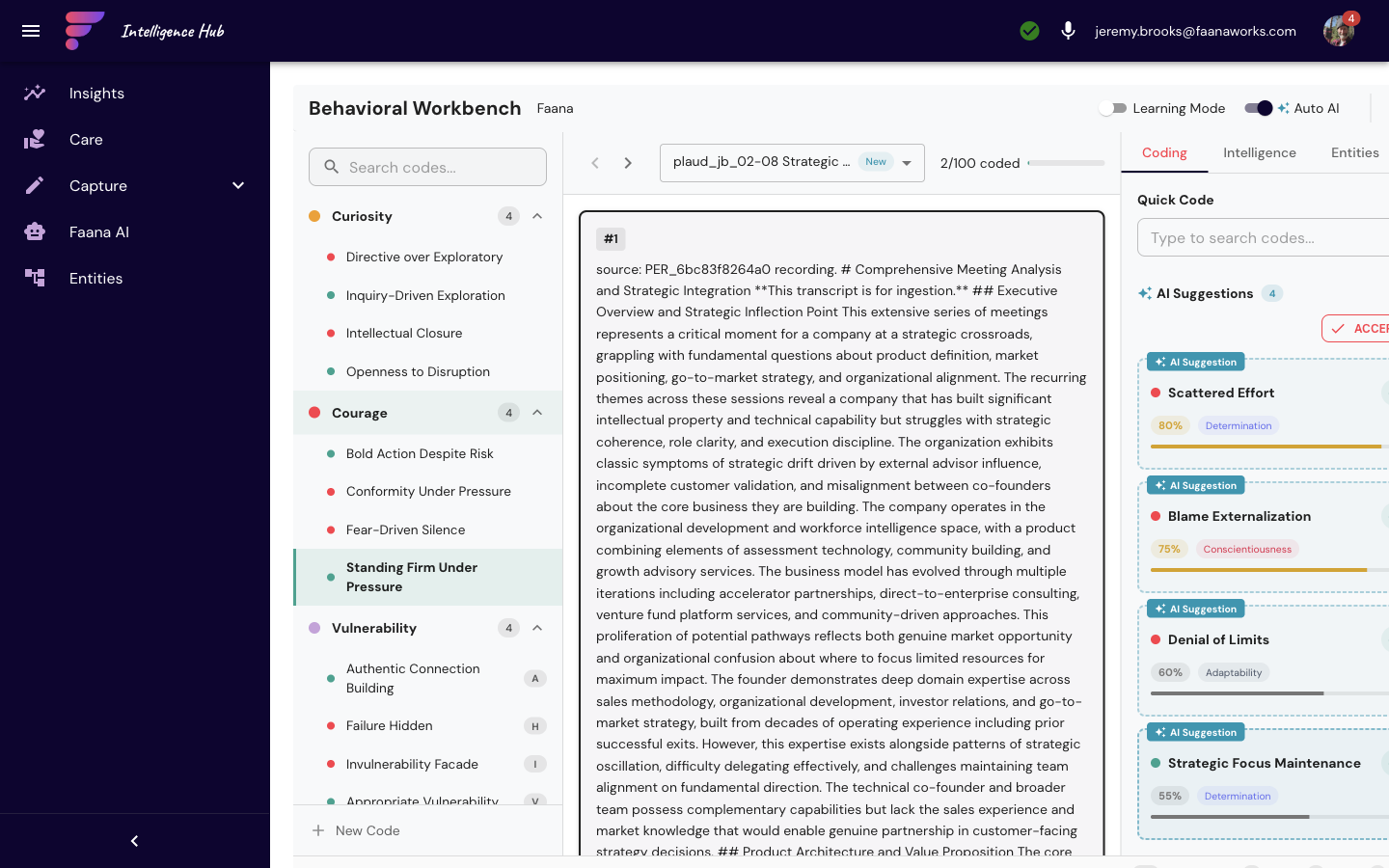
Behavioral Workbench: Complete Feature Detail
Toolbar
- "Behavioral Workbench" title + current entity name
- Learning Mode switch: when ON, shows behavioral code descriptions inline
- Auto AI switch: when ON, auto-fetches AI suggestions on chunk selection
- Search button (Ctrl+F) — focuses Code Browser search
- Keyboard shortcuts button (?) — opens shortcuts modal
Left Panel — Code Browser (280px, resizable 200–400px)
- Search text field to filter codes
- Hierarchical accordion list of 10 Leadership Quality categories, each with its own color:
- Curiosity (amber)
- Courage (red)
- Vulnerability (purple)
- Pursuit of Purpose and People (teal)
- Learning Agility (gold)
- Determination (indigo)
- Self and Situational Awareness (blue)
- Cross-Cultural Communication (green)
- Adaptability (dark gray)
- Conscientiousness (rose)
- Each category: collapse/expand toggle, code count chip, color dot, highlights if any code from this category is used in the current chunk
- Code items: code name, valence color chip (positive=teal / negative=red / neutral=blue), usage count badge, keyboard shortcut key (1–9), Edit button (admin only)
- Footer (admin only): "+ New Code" button (Shift+N shortcut)
Center Panel — Document Viewer (flexible width)
- Document navigation: previous/next buttons ([ and ] shortcuts), document selector ("Doc X of Y"), progress indicator, status badge (Current / In Progress / New / Complete)
- Chunk list: scrollable text segments with paragraph-level granularity (50 chunks per page)
- Chunk states indicated by left border color: default (transparent) / selected (dark) / coded (teal) / AI suggested (blue)
- Applied behavioral code chips displayed on coded chunks (valence-colored pills)
- AI "ghost pills" (semi-transparent teal) for pending AI suggestions
- Click a chunk to select it and update the right panel
Right Panel — Coding Panel (360px, resizable 300–500px)
Three tabs:
Tab 0 — Coding:
- Quick Code Autocomplete input (search and select a code, press Enter to apply)
- Applied codes list: code chip (valence color), confidence %, notes preview, Edit and Delete buttons
- Notes textarea per code (max 2,000 characters)
- AI Suggestions section:
- "Get AI Suggestions" button (AutoAwesome icon, disabled when no chunk selected)
- Loading spinner during AI fetch
- Each suggestion: code name (ghost pill), confidence score, reasoning text, Accept (✓) / Reject (✗) buttons
- "Accept All" button to apply all suggestions at once
Tab 1 — Intelligence:
- Document-level metrics and progress
- Valence distribution (positive / negative / neutral counts with progress bars)
- Quality dimension breakdown (coding coverage per leadership quality)
Tab 2 — Entities:
- Entity profiles with BehavioralScoreCard (radar chart per entity)
- Placeholder for Stage 4 full implementation
Status Bar (Bottom)
Shows document name, chunk position (X/Y), coding progress percentage, and keyboard shortcut hint.
Keyboard Shortcuts
| Shortcut | Action |
|---|---|
1–9 | Apply code with that shortcut number |
n / Enter | Next chunk |
p | Previous chunk |
] | Next document |
[ | Previous document |
a | Accept AI suggestion |
x | Reject AI suggestion |
Shift+N | New code (admin only) |
Ctrl/Cmd+F | Focus code search |
? | Show keyboard shortcuts modal |
Esc | Close modals / blur search |
New Code Modal (Platform Admin Only)
Dialog for creating/editing behavioral codes: code name, Leadership Quality/dimension selector (10 options), valence selector (Positive / Negative / Neutral), description textarea, keyboard shortcut assignment (1–9 or none).
Behavioral codes, once anonymized, are the core input to the Data Collective's Leadership Genome research. Every accepted AI suggestion, every human-verified code, every confidence score becomes a research data point. At scale, this enables Faana to publish the first evidence-based behavioral model of leadership development outcomes.
5.5 Admin Dashboard
Mostly CompleteThe Hub's Admin Dashboard provides the same administration tools as the Workbench (see Section 4.6 for the full breakdown) with four tabs: User Management, Brand Assets, Import Rollbacks, and Audit Log. The Hub version does not include the Coaching Pods tab (that's Workbench-only). Accessible via the hamburger menu for platform admin users.
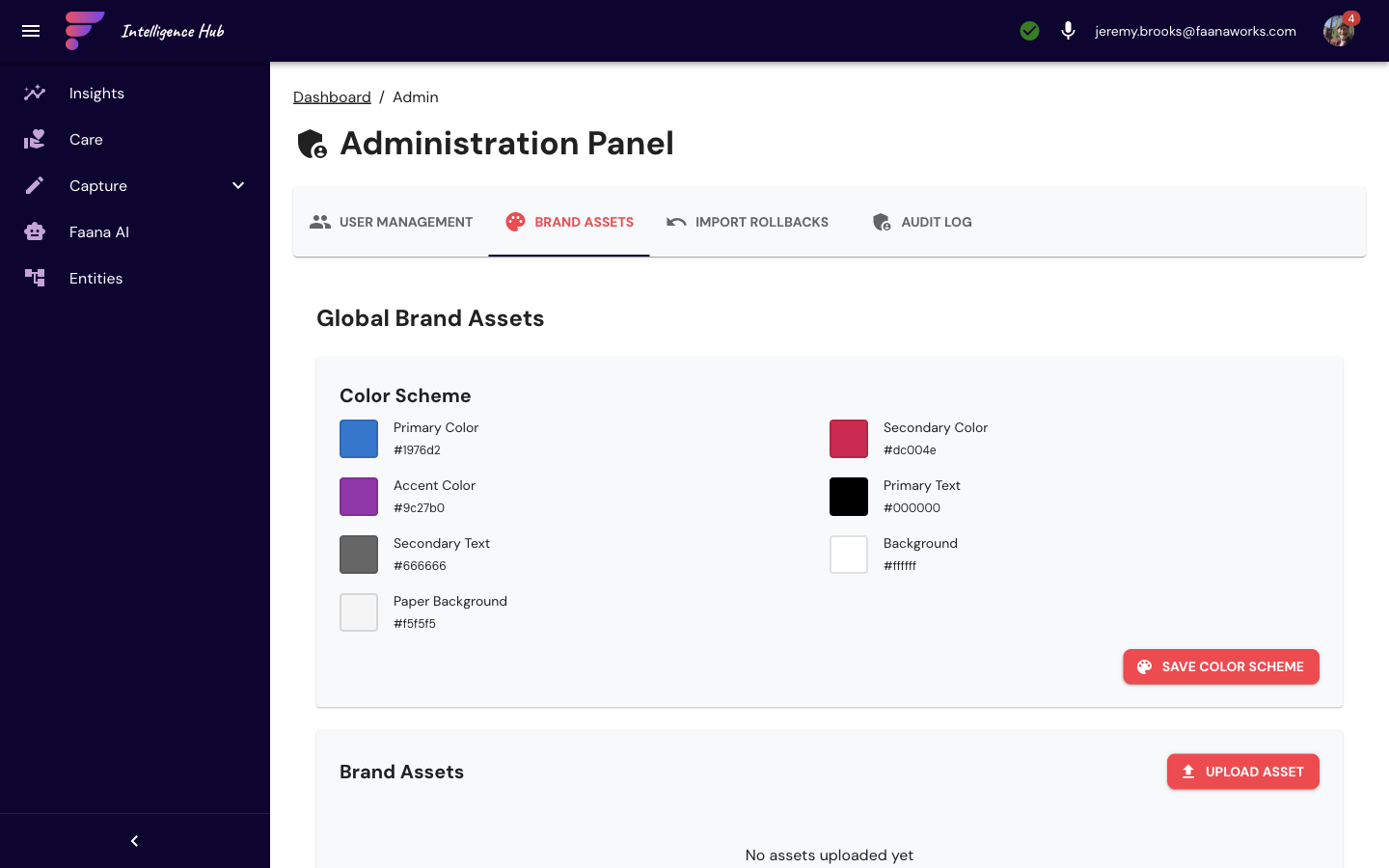
Hub Admin: Role Reference
The Hub Admin's User Management tab supports 7 entity-scoped roles:
| Role | Color | Description |
|---|---|---|
| Entity Admin | Red | Full access within this entity only |
| Entity Manager | Primary Blue | Manage entity discovery and token associations |
| Reports | Green | Generate and export reports |
| Financial | Orange | Access to financial data |
| Leadership | Info Blue | Access to leadership data |
| Personal | Secondary | Access to HR/personal data |
| Basic | Default Gray | Read-only access |
5.6 Shared Features & Deprecated Routes
CompleteCare (CCM) and Faana AI Chat are also available in the Hub as full-page desktop views. They share the same backend data and functionality as their Workbench counterparts (see Section 4.4 and Section 4.5). The Hub versions simply use a wider layout suited to desktop work.
Document Management has been superseded by Faana Agents and auto-redirects there.
6. Key Concepts Glossary
These are the core terms and frameworks you'll encounter throughout Faana Growth OS.
- GOF (Growth Operating Framework)
- Faana's proprietary scorecard for measuring organizational and individual growth fitness — think of it as a "credit score" for leadership and organizational health. The GOF spans 8 blocks in two tiers: Above the Line (Mission, Values, Vision of a Better Place, Core Community, Purpose & Point, Strategy on the Field) represents the aspirational architecture — what the organization believes, where it's going, and who's leading the way. Below the Line (Communication Pathways, Connection Elements) represents the connective tissue — how information flows and how people actually relate to each other. Each block has a status (Not Started / Draft / Reviewed / Confirmed) and a risk score (0–100). The GOF is not a one-time assessment; it's a living diagnostic that evolves as coaching progresses, with revision history and AI-generated summaries tracking how the organization's fitness changes over time.
- 10 Leadership Qualities
- Faana's taxonomy of observable leadership behaviors, grounded in 23 years of methodology. These are not personality traits — they're observable, diagnosable, and developable behaviors: Curiosity, Courage, Vulnerability, Pursuit of Purpose and People, Learning Agility, Determination, Self and Situational Awareness, Cross-Cultural Communication, Adaptability, and Conscientiousness. Each is scored on a 5-level growth scale (Never through Frequently) and tracked over time. These qualities are the taxonomy behind behavioral coding in the Workbench, the axes of the radar chart on leader Player Cards, and the foundation for AI-generated insights about leadership fitness. They connect the Behavioral Workbench (where raw observations become codes) to the Player Cards (where codes become scores) to Reports (where scores become narratives).
- Entity
- Any trackable unit in the system: an Organization, Person, Program, or Community. Entities have types, relationships, permissions, and scoped data. Almost every operation in Faana Growth OS is entity-scoped. Entities are also the nodes of the SNA fabric — every relationship between entities, every document ingested under an entity, every behavioral code applied to an entity builds the organizational intelligence graph.
- Player Card
- A comprehensive profile view for an entity (org or person), showing GOF scores, leadership qualities, network connections, and coaching notes. Named after baseball cards — everything you need to know at a glance. Org cards show 8 GOF blocks; Person cards show 10 Leadership Qualities with radar chart and ego network.
- Zone System
-
A state-based assessment of a leader's nervous system regulation and capacity — not a personality label. Zones can change as conditions change. Zone colors appear on leader avatars, cards, and GOF block risk sliders:
- Green (risk ≤25) — High capacity, clarity, regulation. Creates psychological safety. Intervention: sustain + growth.
- Orange (risk ≤50) — Potential present but needs support and coaching. Intervention: coaching + scaffolding.
- Red (risk ≤75) — High-risk without intervention. Creates churn, chaos, or disillusionment. Intervention: immediate coaching + structural support + care.
- Crimson (risk >75) — Visionary but overloaded. Extraordinary potential but carrying too much. Intervention: care first, then capacity expansion.
- Unassessed — No assessment yet (typically during Discover phase).
Grounded in Phantom Leadership theory: Green zone reflects integrated presence (nervous system + cognitive capacity aligned); Red zone reflects phantom leadership (cognitive dominance without relational presence). Person Player Cards auto-compute zone from GOF risk scores when unassessed.
- Four Fitness Pillars
- Faana measures organizational health across four dimensions, each with its own operating system: Leadership Fitness (LeaderOS) — founder, CEO, 1st team, managers of people; Team Fitness (TeamOS) — collective alignment, trust, accountability; Organizational Fitness (OrgOS) — system-wide coherence and risk; Community Fitness (CommunityOS) — impact, belonging, care infrastructure. These pillars connect the 10 Leadership Qualities, GOF, and engagement data into a unified fitness assessment.
- Engagement Phases
- The four stages of a coaching engagement: Not Engaged (pre-engagement), Discover (days 1–14, initial assessment), Diagnose (days 15–30, deeper analysis), Align (days 31–60, strategy development), Grow (days 61–90, sustained development). The 90-day engagement is Faana's standard coaching cycle. Displayed as phase chips on reports and leader cards.
- Leader Tiers
- Classification of leaders within an organization: Founder, 1st Team (executive leadership), Managers of People (mid-level), and Rising Leader (emerging talent). Displayed as chips on leader cards.
- CCM (Connected Community Model)
- Faana's framework for mapping and curating the support ecosystem around leaders and organizations. The CCM addresses a core Faana thesis: care has been removed from the architecture of work. It organizes resources across four pillars — Capacity (can you do it? — coaches, trainers, skills), Care (are you okay? — wellness, emotional health, caregiving support), Capital (can you fund it? — advisors, investors, financial resources), and Community (who's with you? — networks, peer groups, belonging). Coaches curate each entity's Care page manually or through AI Chat. The CCM is the data layer for Faana's larger vision: the Coordinated Care & Currency Network and Tokens of Care, where doing the work of leadership development automatically funds care for those in need.
- PTL (Privacy Tokenization Layer)
- The privacy boundary between raw documents and intelligence. Before any document is analyzed by AI,
the PTL uses Google Cloud’s Data Loss Prevention API to detect and replace sensitive information across
eight categories — personal identifiers, government-issued IDs, financial data, HIPAA-relevant health
information, credentials and secrets, digital identifiers, demographics, and organizational references —
with secure tokens using Cloud KMS encryption (AES-256-GCM). The result: the platform can analyze
documents, discover entities, extract relationships, and generate reports without ever storing raw PII
in analysis databases. Tokens like
PER_abc123(person) andORG_def456(organization) flow through the Token Examiner and SNA vector store. De-tokenization happens only in the UI at display time, ensuring data analysts and AI models never see sensitive information. Supports .txt, .md, .html, .json, .pdf, .docx, .xlsx files.
- SNA (Social Network Analysis)
-
The intelligence layer that maps how people and organizations actually relate to each other — not from org charts, but from behavioral evidence in documents, communications, and coaching observations. The SNA system stores relationship data as "chunks" in an Elasticsearch index with 768-dimensional vector embeddings, enabling semantic search across all relationship evidence.
SNA surfaces throughout the platform: Ego Network visualizations on leader cards, Signal Intelligence (30-day behavioral signals), AI Chat grounding (via the
search_sna_chunksMCP tool), report generation variable injection, and the Behavioral Workbench coding pipeline. The system uses hybrid search (vector similarity + text matching) with security-correct entity scoping to prevent cross-entity data leakage.SNA is central to Faana's thesis that the largest unpriced risks in organizations are behavioral and relational, not financial. Network patterns — isolation of key leaders, communication pathway degradation, relationship health trends — are early warning signals that financial metrics will only reflect 12–18 months later. SNA surfaces these signals first.
For technical details on the SNA pipeline, embeddings, and 23+ API endpoints, see Section 7: Data Flow & Architecture and the AI Intelligence Map.
- EIR (Entity-in-Relationship)
-
An analysis framework for understanding how an entity functions within its relationships. On the
Org Player Card, the EIR section shows Executive-in-Residence assignments and
talent matching. The deeper Precision Fit tab on Person Player Cards — which
performs skill-fit analysis for talent assignment — is built but will launch in a future release.
The API layer (
entityManagementApi) fully supports EIR operations.
- Token Examiner
-
An AI analysis framework that discovers entities, relationships, and temporal patterns from ingested documents through a 4-pass pipeline: Pass 0 extracts dates (Gemini 2.5 Flash), Pass 1 discovers entities and relationships within documents, Pass 2 links mentions across documents, and Pass 3 tracks relationship evolution over time (Passes 1-3 use Gemini 2.0 Flash via LangChain agents).
Beyond the core passes, TE provides relationship health analysis, network graph generation, entity match suggestions, provenance tracking, temporal analysis, and 6 D3-based network visualization types. Results flow into Entity Discovery, the SNA vector store, Firestore relationship rollups (for Ego Networks), and the Global Token Pool.
For the complete pipeline architecture, see Section 7: Data Flow. For the Hub UI, see Section 5.1: Entity Management.
- Global Token Pool (GTP)
-
The Elasticsearch-backed identity resolution backbone of the platform. Every time the PTL tokenizes a document, entity tokens (people, organizations, locations) are written to the
global-token-poolindex, creating a cross-entity, cross-document registry of every named entity ever mentioned. GTP uses a 5-strategy search (exact, fuzzy, prefix, last-name match, plus context rescoring) to resolve messy real-world names — "Dr. Sarah Chen," "S. Chen," "Sarah" all map to the same canonical identity.For the full GTP browser and technical details, see Section 5.1: Entity Management.
- MCP (Model Context Protocol)
- An open protocol that gives AI assistants the ability to take real actions beyond just generating text. In Faana Growth OS, the AI Chat uses 25+ MCP tools organized into categories: entity and coaching data retrieval (leader profiles, GOF scores, assessments), search and discovery (notes, SNA vectors, web), Care resource management (search, add, pin, remove from CCM pillars), relationship analysis (entity connections, network dynamics), document access (Drive files, IP library), and report tools. Each tool runs within the user's entity scope with proper authentication. Users control permissions per tool (Always Allow / Never Allow / Ask Each Time) — write operations always require confirmation, while read operations can flow automatically for natural conversation.
- Vector Indexes & Embeddings
-
Faana uses two Elasticsearch indexes that serve fundamentally different purposes:
global-token-pool— Keyword-based search index for identity resolution. Stores entity tokens with multi-strategy text search (exact, fuzzy, prefix, last-name). Does not currently use vector embeddings for retrieval (embedding generation is planned via Pub/Sub but not yet active).sna_chunks— Vector search index for semantic relationship intelligence. Each chunk has adense_vectorfield (768 dimensions) containing an embedding from Google'stext-embedding-004model. Supports KNN search with cosine similarity. Pass 0 chunks also have a separatedate_embedding(768 dimensions) for time-aware queries.
Chunking strategy: Documents are split using semantic chunking with a target size of 512 tokens and 50-token overlap between chunks. Each chunk stores its
content_checksum(SHA-256 of entityId + documentId + content) for deduplication, and positional metadata (paragraph index, sentence index, page number, y-position on page) for document reconstruction.What gets embedded: PTL documents get content embeddings after tokenization. Token Examiner Pass 0 generates date embeddings. TE Passes 1-3 generate relationship chunks with content embeddings. Entity-level rollups are also vectorized for aggregate network queries.
Feature flags: The vector system supports configurable capabilities:
hybridSearch(combine vector + text),crossEncoderReranking(rerank results with a cross-encoder model),MMR(maximal marginal relevance for result diversity), anddateExtraction. Currently hybridSearch and dateExtraction are active; cross-encoder and MMR are available but not enabled by default.
- Behavioral Code
- A structured annotation linking a text selection from a source document to one of the 10 Leadership Qualities. Created in the Behavioral Workbench. Each code has a valence (positive/negative/neutral), confidence score, and optional notes.
- Coaching Pod
- A team of coaches assigned to work together on an engagement, modeled on the Sports Franchise Model: Head Coach → Assistant Coach → Special Position Coach → Rider (talent apprentice). Each pod has named members with role chips, entity assignments, and is managed via the Admin Dashboard. The pod structure ensures continuity of care — if one coach is unavailable, the engagement doesn't stall. It also creates a coaching apprenticeship pipeline where Riders gain hands-on experience while strengthening their 10 Leadership Qualities.
- ILOS (Individual Leadership Operating System)
-
Faana's model for individual leadership fitness. ILOS has five components that flow as a system:
- Foundation (Structure) — Identity, Personal Culture, Capacity, Grounding. Who you are before you lead.
- Strength (State Variable) — Current fitness condition. Not fixed — it fluctuates with stress, support, and recovery.
- Expansion (Process) — Growth trajectory. Where potential converts to capability through practice and stretch.
- Engagement (Diagnostic Surface Signal) — Observable expression of internal alignment. Engagement is not a personality trait — it is a dynamic interactional state variable. When internal alignment exists, engagement emerges naturally.
- Growth (Emergent Outcome) — What emerges when all four preceding components are coherent. Growth cannot be forced — it can only be cultivated.
The 10 Leadership Qualities map to ILOS components. For example, Vulnerability maps to Foundation (willingness to expose the real self creates the trust foundation), while Cross-Cultural Communication maps to Engagement + Expansion (leading across boundaries requires both visible expression and growth trajectory).
- Tokens of Care
- Faana's unit of measurement for care-related actions within the platform. When coaches and leaders do the work of growth well — completing assessments, coding behaviors, supporting team development — the work itself generates Tokens of Care that fund care for those in need. This is a flywheel, not a feature: doing the work well automatically creates a care economy. Tokens power the Care Currency Card and feed the Community Pool.
- Care Currency Card
- A physical and digital instrument powering Faana's closed-loop care economy. Employers issue the card as a welcome gift. Care categories include childcare, food, housing, moving expenses, time-off support, health coaching, educational programs, legal consultation, and care navigation hours. 100% of pay-forward flows go to the Community Pool (zero Faana fee), administered through FaanaWorks 501(c)(3). Revenue comes from Partner Platform Fees, Card Pre-Loads (stored-value trust), and Transaction Fees (5-8% per redemption at partner providers).
- Data Collective
- Faana's public benefit research structure for anonymized, aggregated behavioral and organizational data across clients. Once sufficient consent and anonymization protocols are in place, the Data Collective provides the cross-client corpus for Leadership Genome research, Innovation Deficit studies, and industry benchmarking. The Data Collective is what separates Faana from a coaching tool — it is the infrastructure for a new field of organizational intelligence research. Governance defines what this data can and cannot be used for.
- Human Infrastructure
-
The complete system required to support humans in performing complex work — and the reason Faana exists. Four pillars are missing from how most organizations grow:
- Capacity — Leadership capacity deficit at scale; organizations grow faster than leaders develop
- Culture — Culture as operating system failure; values are stated but not practiced
- Care — Care has been removed from the architecture of work; people don't have what they need
- Connected Capital — Capital is disconnected from context; investment decisions lack human system intelligence
Not to be confused with the CCM four pillars (Capacity, Care, Capital, Community) or the Four Fitness Pillars (Leadership, Team, Organizational, Community Fitness) — three different frameworks addressing different levels of the system.
- Innovation Deficit Research Initiative
- Faana's core research thesis: there is a measurable link between leadership development, organizational design, and innovation capacity — with specific focus on women, minorities, and underrepresented founders. Faana is actively seeking academic institutions and private market funds to study, measure, and prove this link. Not a side project — foundational to Faana's mission. Proving this thesis with academic rigor makes the case for investing in human systems undeniable.
- Leadership Genome
-
The measurable pattern of traits, competencies, intelligences, and behavioral signatures that define conscious, effective leadership. Not a single profile — a genome that varies by context but shares core DNA: self-awareness (emotional, relational, systemic), nervous system regulation, adaptive capacity, relational intelligence, values alignment between stated and practiced, and the capacity to hold complexity without collapsing into simplicity.
The Leadership Genome is built from the bottom up. Every behavioral code applied in the Behavioral Workbench against the 10 Leadership Qualities is a data point. Multiplied across hundreds of leaders, dozens of organizations, and years of longitudinal observation, a pattern language emerges — one that can identify early signals of leadership growth or organizational risk before they appear in financial metrics. The Leadership Genome is the core research product of the Data Collective and the foundation for Precision Fit matching.
- Precision Fit
- Diagnostic-driven matching of talent to opportunities, coaches to organizations, and solutions to problems — based on contextual behavioral data from the Leadership Genome, not resumes or credentials. When the entity graph and behavioral coding data reach sufficient density, Precision Fit can answer: "Which coach is the right fit for this leader, given their behavioral patterns, organizational context, and development trajectory?" The EIR (Entity-in-Relationship) Precision Fit tab on Person Player Cards is built and will launch in a future release. See Section 5.1.
- Process Visibility
- The cross-cutting data lineage system that tracks every document from ingestion through privacy tokenization to entity discovery. Uses a document-centric architecture where every log entry traces to a real GCS file via a deterministic 16-character hex ID. Also tracks AI report generation lineage — which source documents, tokens, and MCP tools contributed to each report variable. See Section 8.
7. Data Flow & Architecture
Understanding how data moves through Faana Growth OS helps you understand why each piece exists and how they connect. Here's the journey data takes from source to insight. Every step in this pipeline is tracked by the Process Visibility system, providing complete data lineage from raw file to generated intelligence.
The Data Pipeline
Step by Step
- Ingestion: Documents arrive from Google Drive (auto-synced shared drives), Slack messages (via OAuth integration), Google Forms responses, or direct file uploads. Coaches can also record audio notes that generate transcripts.
- Storage: Files land in entity-scoped Cloud Storage at
gs://faana-client-{entityId}-data/, ensuring strict data isolation between entities. - Tokenization (PTL): Before any data is stored or processed, the Privacy Tokenization Layer
uses Google Cloud’s DLP API to detect sensitive information across eight categories (personal identifiers,
government-issued IDs, financial data, HIPAA-relevant health information, credentials, digital identifiers,
demographics, and organizational references) and encrypts it using Cloud KMS (AES-256-GCM). Nothing
downstream ever sees the original values. The document now contains tokens like
PER_abc123instead of real data. - AI Analysis (Token Examiner): The tokenized document passes through a flexible,
multi-pass AI analysis pipeline. Today it runs four passes:
- Pass 0 (Gemini 2.5 Flash): Extracts the authoritative document date and all temporal references. Resolves relative dates ("next Tuesday") against the document date, not today's date. This is the anchor for all subsequent temporal analysis.
- Pass 1 (Gemini 2.0 Flash): Discovers entities and relationships within each document — who's mentioned, what roles they play, how they relate to each other, with evidence quotes and confidence scores.
- Pass 2 (Gemini 2.0 Flash): Links entity mentions across multiple documents. Tracks how the same person or organization appears in different contexts, building a cross-document profile with inferred roles, key relationships, and behavioral patterns.
- Pass 3 (Gemini 2.0 Flash): Analyzes how relationships between specific entities evolve over time, identifying patterns of strengthening, weakening, or transformation.
- Indexing (Two Indexes): Results flow into two separate Elasticsearch indexes:
- Global Token Pool (
global-token-pool) — receives entity tokens from PTL processing. This is the cross-entity, cross-document identity resolution index. Uses keyword-based multi-strategy search (exact, fuzzy, prefix, last-name match) with context rescoring. Every mention of a person, organization, or location across all documents is tracked here. - SNA Chunks (
sna_chunks) — receives analysis chunks from PTL vectorization and Token Examiner passes. This is the entity-scoped semantic search index. Each chunk stores content plus a 768-dimensional vector embedding for cosine similarity search. Pass 0 chunks also get a separatedate_embeddingfor time-aware queries.
- Global Token Pool (
- Embedding: Content is converted to 768-dimensional vectors via Google's
text-embedding-004model. Semantic chunking (512 tokens, 50 overlap) splits documents into search-optimized pieces. Each chunk gets a SHA-256 content checksum for deduplication and positional metadata (paragraph, sentence, page, y-position) for document reconstruction. This enables semantic similarity search: "find leaders with similar network dynamics" becomes a mathematical KNN operation with entity-scoped pre-filtering for security. - Network Graph: The Token Examiner aggregates relationship evidence into
relationship_rollupsin Firestore, which power the Ego Network visualization (concentric and force-directed layouts), PersonScorecards (behavioral code distribution by Leadership Quality), and RelationshipPanels (co-mention frequency and interaction evidence). Six D3-based visualizations in the Intelligence Hub offer different lenses on the same data: force-directed graph, arc diagram, radial cluster, tree of life, and more. - Human Intelligence: The Behavioral Workbench adds human-verified behavioral codes that
map text observations to the 10 Leadership Qualities. These codes are written directly back to
sna_chunks, closing the loop between human observation and machine intelligence. Each chunk can carry multiple behavioral codes with valence (positive/negative/neutral), confidence scores, and aggregated risk metrics. - Output: All of this converges into the features coaches use daily: AI-generated Reports (populated with real entity data via parallel variable processing), Chat insights (grounded in SNA vector search and document retrieval), Player Cards (radar charts from aggregated behavioral codes, ego networks from relationship rollups, quality scores from coach assessments), GOF assessments, and the GOF Storyline (AI-generated narrative cached with staleness detection via SHA hash comparison).
- Leadership Genome: Behavioral codes, quality scores, and longitudinal patterns aggregate into the Leadership Genome — the measurable behavioral model that grows with every coaching engagement.
- Data Collective: Anonymized, aggregated intelligence feeds the Faana Data Collective — enabling cross-client benchmarking, academic research partnerships, and the Innovation Deficit Research Initiative.
Entity Model
Organization
Companies, nonprofits, institutions. Has leaders, runs programs, produces documents.
Person
Leaders within organizations. Assessed on 10 Leadership Qualities, tracked over time.
Program
Coaching engagements, workshops, development tracks. Enrolls leaders from organizations.
Community
Networks of practice, cohorts, cross-org groups. Members drawn from multiple organizations.
8. Process Visibility & Data Lineage
Every piece of generated intelligence in Faana Growth OS — every report variable, every behavioral code suggestion, every entity discovered by the Token Examiner — can be traced back to its source document. This isn't a debugging tool bolted on after the fact. Process Visibility is a cross-cutting system designed from the ground up to answer the question: "Where did this insight come from?"
For a platform building toward scientific research and a Data Collective, data lineage isn't optional. Every claim about a leader's behavioral pattern, every organizational fitness score, every network relationship must be auditable. Process Visibility makes that possible.
Document-Centric Architecture
The V3 Process Visibility logger enforces a strict rule: every log entry must trace to a real document in Google Cloud Storage. No fake entries, no arbitrary IDs, no orphaned logs.
- Document ID: A 16-character hex string derived from the SHA-256 hash of the
GCS path (
gs://bucket/path/to/file). This ID is deterministic and immutable — the same file always produces the same ID. - Processing Context: Every operation carries a
ProcessingContextobject containing the document ID, GCS path, and optional metadata (token ID, chunk ID, batch ID, trigger type, user ID). This context flows through every pipeline stage. - Validation: The logger validates that the document ID matches the hash of the GCS path. You cannot create a process log entry for a document that doesn't exist.
Pipeline Stage Tracking
Each document's journey through the platform is tracked across three pipeline stages, stored in
Firestore at process_visibility/{entityId}/document_progress/{documentId}:
| Stage | What Happens | Tracked Metrics | Status Flow |
|---|---|---|---|
| Ingestion | File downloaded from Google Drive (or uploaded directly) and placed in GCS at
gs://faana-client-{entityId}-data/ |
Files processed, bytes transferred, ingestion point name | pending → processing → completed |
| PTL (Privacy Tokenization) | Sensitive data across eight categories (personal identifiers, government IDs, financial data, HIPAA-relevant health info, credentials, digital identifiers, demographics, organizational references) detected via Google Cloud DLP API, replaced with deterministic tokens, encrypted with KMS (AES-256-GCM), stored in BigQuery and Elasticsearch Global Token Pool | Tokens created, tokens processed, KMS operations | pending → processing → completed |
| Token Examiner | AI-powered entity extraction, relationship discovery, embedding generation across 4 analysis passes (date extraction → within-document → cross-document → temporal) | Tokens examined, entities discovered, relationships found | pending → processing → completed (with circuit breaker for retries) |
Each stage independently tracks: status, start/end time, duration, step count, error count, and
the last operation performed. A document's overall status is derived from the
combination of all stage statuses, along with a list of completed stages
(e.g., ["ingestion", "ptl"] means TE hasn't run yet).
Report Lineage Tracking
When a coach generates an AI report, a separate lineage layer tracks exactly which source data
contributed to each variable in that report. The ProcessVisibilityReportLogger stores
this at process_visibility/{entityId}/report_building/{reportId}:
- Variable-level tracking: Each template variable (e.g., "leadership_summary", "network_analysis") is logged independently with its own status (processing, completed, error, insufficient_data), processing time, AI model used, and token counts.
- Source tokens: Every piece of source data used to generate a variable is recorded
as a
ReportTokenwith the source document ID, source type (BigQuery, Firestore, GCS, or MCP Tool), source path, confidence score, and which variable it contributed to. - Prompt capture: For debugging and quality assurance, the complete system prompt, user prompt, and assembled prompt are stored with each variable result.
- MCP tool usage: When the AI uses MCP tools during report generation, the specific tools invoked are logged per variable.
The Intelligence Hub UI
Process Visibility lives in the Intelligence Hub under Data Management → Process Visibility. The UI provides:
- Document timeline: A 3-column pipeline view (Ingestion → PTL → TE) showing each document's current status with duration indicators and error counts.
- Advanced filtering: Five filter categories — basic (search, subsystem, status), date range (with presets: last hour, 24 hours, 7 days, 30 days), document properties (filename, MIME type, extensions, file size range), processing details (errors only, has tokens, duration range, log levels), and user ID.
- Stage detail modal: Click any pipeline stage to see its full step history, operation sequence, timing breakdown, error details, and metadata.
- Real-time polling: The UI polls the API using a
lastTimestampcursor, receiving only documents updated since the last check. No WebSocket required. - Per-entity settings: Configurable logging parameters per entity — log level, batch sizes, flush intervals, memory limits. Four quick presets: High Performance, Real-Time Visibility, Debug Mode, Low Memory.
Why Data Lineage Matters for Faana
Process Visibility isn't just operational monitoring. It's the audit backbone for Faana's data strategy. When a report claims a leader demonstrates strong Curiosity, the lineage can trace that claim back to: the specific report variable → the AI prompt that generated it → the SNA chunks it drew from → the behavioral codes applied to those chunks → the tokenized documents those codes came from → the original files in Google Drive. That chain of evidence is what makes the difference between an opinion and a researchable finding.
A planned enhancement will expose the complete lineage chain in the Workbench, allowing coaches to click on any insight and trace it back to its source documents. This will also support the Data Collective's requirement for reproducible, citation-backed behavioral research.
9. AI Intelligence Map
AI is not a feature in Faana Growth OS — it is the connective tissue that makes the entire platform intelligent. Every major user interaction is powered, enhanced, or informed by AI. This section maps every AI integration point across both apps, showing what models power them, how they connect to the user experience, and why they matter for Faana's mission.
AI Models in Production
| Model | SDK | Where Used | Why This Model |
|---|---|---|---|
| Gemini 2.5 Flash | Vertex AI SDK (direct) | Pass 0 date extraction, GOF storyline, GOF revision summaries, Leadership Quality summaries, PTL summarization, EIR precision matching | Best quality/speed balance for structured output. Uses thinkingBudget to control internal reasoning (1024-8192 tokens). Chosen over LangChain for prompts >120K chars due to a LangChain bug. |
| Gemini 2.0 Flash | LangChain ChatVertexAI |
AI Chat (streaming + batch), report generation, variable processing, chat title generation, prompt testing | Optimized for tool-calling agents. LangChain provides the agent framework (tool registry, memory, callbacks). Supports SSE streaming for real-time chat. |
| Gemini 2.0 Flash (Exp) | LangChain ChatVertexAI |
Token Examiner Passes 1-3 (agent), behavioral AI suggestions | Experimental variant with enhanced reasoning for multi-step entity/relationship discovery. TE runs as a LangChain agent with dedicated tool registry and dialogue logging. |
| text-embedding-004 | LangChain VertexAIEmbeddings |
SNA chunk embeddings, date embeddings (Pass 0), TE entity embeddings | 768-dimensional vectors optimized for semantic similarity. Powers all KNN search and relationship matching. |
| Whisper | Self-hosted on Cloud Run | Audio transcription (server-side) | High-quality speech-to-text for coaching recordings and voice notes. VAD-enabled for long recordings. |
| Kokoro-82M | ONNX in Web Worker (browser) | Text-to-speech in AI Chat voice response mode | Local neural TTS model — runs entirely in the browser with no server round-trip. 28 voices (American/British, male/female). Progressive streaming: starts speaking before the full LLM response arrives. |
| Web Speech API | Browser native (Chrome) | Voice input (Active Mic mode), audio recording transcription | Real-time browser-side speech recognition. Always listening for wake word "Hey Coach." Provides instant transcription during audio recording. |
| Perplexity (sonar-pro) | REST API | Web research, fact checking, news, comparison analysis (MCP tools in Chat) | Gives the AI Chat access to current web information. Five MCP tools: search, research topic, fact check, get news, compare. |
AI Integration Points — Faana Workbench (Coach-Facing)
The Workbench is where coaches interact with AI every day. Every AI feature is designed to reduce the cognitive load of coaching — surfacing the right intelligence at the right moment so the coach can focus on the human relationship.
| Feature | AI Capability | How It Triggers | What the Coach Sees |
|---|---|---|---|
| AI Chat (Streaming) | Conversational AI agent with 25+ MCP tools, access to all entity data | Send a message, voice command ("Hey Coach"), or tap the chat FAB | Token-by-token streaming response with tool-use indicators ("AI is running searchSnaChunks..."). MCP confirmation dialog for write operations. Markdown rendering with code blocks, tables, links. |
| Voice Input (Active Mic) | Always-on speech recognition with wake word detection | Toggle Active Mic in chat header, then say "Hey Coach" (or variations) | Mic icon pulses red. Live interim transcription appears in input field. Voice commands: "send now," "clear," "stop." Battery monitoring auto-disables below 20%. |
| Voice Output (TTS) | Local neural text-to-speech (Kokoro-82M) with progressive streaming | Toggle Voice Response in chat header | AI reads responses aloud as tokens arrive (doesn't wait for full response). 28 voice choices. Status banner: "Generating speech..." / "Speaking..." Volume icon pulses blue. |
| Note-Taking Mode | AI transcribes conversation into persistent notes | Say "start taking notes" or AI uses toggle_note_taking MCP tool |
Note icon indicator in message input. Notes saved to entity's notebook automatically. |
| GOF Storyline | AI-generated organizational narrative from GOF blocks, notes, and assessments | Auto-loads on Org Player Card. "Generate Storyline" button for refresh. | Dark card at top of org page with: overall narrative (clamped to 3 lines), completion/risk chips, expandable strategic themes, block summaries (clickable), prioritized recommendations. Staleness indicator when GOF data has changed. Elapsed time counter during generation. |
| GOF Block History Summary | AI narrative of how a GOF block evolved over time | Auto-fetches when opening any GOF block modal | Narrative text showing change patterns, with "Regenerate" button. Loading spinner during generation. |
| Leadership Quality Revision Summary | AI change summary comparing previous vs current revision | Click "Generate AI Summary" button on a specific revision | AutoAwesome icon button. CircularProgress + "Generating summary..." then natural-language change description. |
| Signal Intelligence (SNA Vector Search) | Semantic search for behavioral evidence from documents | Expand any of the 10 Leadership Quality rows on a Person Player Card | Text excerpts from analyzed documents with date, source name, and behavioral code chips. Lazy-loaded per quality (first expand only). |
| Behavioral Workbench AI Suggestions | AI suggests behavioral codes for each text chunk | Auto-fetches 1.5s after navigating to a chunk (when "Auto AI" is on), or Alt+G manually | Blue-bordered suggestion cards with: code name, confidence % (color-coded: green ≥85%, gold ≥70%, gray below), dimension chip, reasoning text, evidence quotes. Accept/Reject buttons (A/X keys). "Accept All" for batch. |
| Report Generation | AI populates template variables from entity data via parallel LLM processing | "Generate Report" button on Reports timeline or empty state | Multi-step wizard: select type → configure → generating (wave skeletons) → editor. Variable processing display shows per-variable status. Workflow progression: AI → Coach → Pod → HC Final. |
| Audio Transcription | Dual-path: browser-side (Web Speech API) + server-side (Whisper) | Record audio via mic button in header or Notebook | "Auto-generated" chip on live transcription. Editable transcript field. Server-side transcript available after processing. |
| AI Note Title | Auto-generates 7-word title from audio transcript | Automatic after transcription (≥20 characters) | "Generating title from transcript..." placeholder in title field, then AI-generated title appears. Skipped if user manually edits. |
| Auto Chat Title | AI generates 3-6 word title for chat conversations | Automatic after 3rd user message | Chat title updates in sidebar/header silently. |
| Ego Network | Network visualization from AI-discovered relationships (Token Examiner output) | Navigate to "Network" tab on Person Player Card | Concentric circle or force-directed layout of nodes and edges. Click node for PersonScorecard (behavioral radar chart + evidence). Click edge for RelationshipPanel (co-mentions, interactions). |
AI Integration Points — Intelligence Hub (Admin/Power-User)
| Feature | AI Capability | How It Triggers | What the User Sees |
|---|---|---|---|
| Token Examiner (4-Pass Pipeline) | AI entity/relationship discovery from documents via LangChain agents | "Analyze" button on Data Management > Token Examiner tab, or auto-triggered by Firestore onDocumentTokenized |
ExaminationProgress component showing pass-by-pass status. Agent dialogue logs viewable for debugging. Results feed Entity Discovery and SNA indexes. |
| TE Network Visualizations | 6 D3-based chart types rendering AI-discovered relationship graphs | View results in Token Examiner UI | Force-directed graph, disjoint force graph, arc diagram, radial cluster, tree of life, patent-suits graph. Each offers a different analytical lens on the same relationship data. |
| Entity Discovery | AI-powered extraction of entities from documents with confidence scoring | Auto-populated by Token Examiner pipeline. Firestore triggers auto-initiate. | Pending discoveries table with confidence levels. Three actions: Find Matches (ML similarity), Create New Entity, Reject (with reason). Audit trail for all decisions. |
| Report Generation (Chat-Initiated) | Template-based report generation with MCP tool access | "Generate Report" in Chat interface | VariableProcessingDisplay: live table of each variable (pending/processing/completed), tool call counts, prompt inspector. ReportCompletionDisplay: preview, download, compile. |
| AI Template Generation | Generate HTML document templates from requirements | "Generate with AI" button in Document Management | User provides template type + requirements. AI generates full HTML template with {{variable}} placeholders. |
| Behavioral Workbench AI Suggestions | Same AI suggestion system as Workbench (desktop layout) | Same triggers (Auto AI toggle, Alt+G) | Same suggestion cards in desktop 3-panel layout. |
| Prompt Management (Admin) | Full CRUD for AI prompts with version control and testing | Admin > Prompt Management | Version history, comparison, restore/delete. Version tags (draft/stable/deprecated/experimental). Category filters. Lock flag. Default designation. "Test Prompt" with live AI execution. |
| Dashboard Report Generation | Entity-level AI-generated dashboard reports | "Generate Report" on Hub dashboard or Workbench Reports page | Polling for completion with progress indicators. |
| Perplexity Web Research (5 Tools) | Web search, topic research, fact checking, news, comparisons | AI Chat uses these as MCP tools when web context is needed | AI responses cite web sources. Five distinct tools: perplexity_web_search, perplexity_research_topic, perplexity_fact_check, perplexity_get_news, perplexity_compare. |
AI Integration Points — Backend Pipeline (Invisible to Users)
These AI systems run automatically in the background. Users benefit from them but never interact with them directly.
| System | Model | What It Does | Where Results Surface |
|---|---|---|---|
| PTL Summarization | Gemini 2.5 Flash | DLP-safe summarization: tokenizes PII before sending to AI, detokenizes result. Four levels: title (7 words), short (25), standard (75), detailed (150). | Audio note titles, document summaries in various UI surfaces |
| SNA Embedding Generation | text-embedding-004 | Converts text chunks to 768-dim vectors. Runs after PTL processing and each TE pass. | Powers all semantic search: Chat MCP tools, Signal Intelligence, Behavioral Workbench document loading |
| EIR Precision Fit Matching | Gemini 2.5 Flash (2-stage) | Matches leaders to Executive-in-Residence coaches. Stage 1: shortlist by need category. Stage 2: deep scoring with fit dimensions and reasoning. 7-day Firestore cache. | Built and working but UI not yet launched (hidden tab on Person Player Card) |
| Whisper Audio Transcription | Whisper (Cloud Run) | Server-side transcription of audio files flowing through the PTL pipeline. VAD-enabled for long recordings. Results cached as .transcript.txt in GCS. |
Transcripts appear on audio notes in Notebook and audio playback components |
| Relationship Health Analysis | Gemini 2.0 Flash (LangChain) | LLM-based assessment of relationship quality with optional intervention plans | Network health scores in Ego Network panel, relationship strength indicators on Player Cards |
Three Dimensions of AI
AI in Faana Growth OS is not one thing. It operates across three distinct dimensions, each with a different relationship to the user, a different trigger model, and a different role in the intelligence pipeline. Understanding these dimensions is key to understanding where the platform is today and where it's going.
Dimension 1
Interaction-Gated
The user asks, the AI responds. This is the conversational layer — AI Chat, voice commands, manual report generation, on-demand GOF storylines. The coach is in control. AI waits until called.
Trigger: User action (message, button, voice)
Examples: Chat with MCP tools, "Hey Coach" voice input, "Generate Storyline" button, behavioral code suggestions (Alt+G)
Model: Gemini 2.0 Flash via LangChain agent
Dimension 2
Pipeline-Embedded
AI that runs automatically as part of data processing. When a document enters the system, AI activates without anyone asking. This is the intelligence factory — extracting, analyzing, embedding, discovering.
Trigger: Data event (Firestore write, document upload, PTL completion)
Examples: Token Examiner 4-pass analysis (auto-triggered by onDocumentTokenized),
SNA embedding generation, PTL summarization, date extraction, EIR Precision Fit matching
Models: Gemini 2.5 Flash (structured output), Gemini 2.0 Flash Exp (agent reasoning), text-embedding-004 (vectors)
Dimension 3
Always-On Proactive
AI that monitors, detects patterns, and initiates interaction with people — without being asked. This is the next architectural evolution: creative agents that observe the data landscape and reach out when they see something worth acting on.
Trigger: Time-based schedules, threshold violations, pattern detection
Examples (Planned): "I noticed Derek's Curiosity scores dropped across 3 sessions — worth discussing?", pre-session briefings pushed to coach, relationship health alerts, stale engagement detection
Foundation: Scheduled functions, Firestore triggers, Slack alerting already exist
Where the Platform Stands Today
Dimensions 1 and 2 are fully operational. The interaction-gated layer (Chat, voice, reports) handles the coach's daily workflow. The pipeline-embedded layer (Token Examiner, embeddings, PTL) runs continuously in the background, building the SNA fabric and Leadership Genome with every document processed.
Dimension 3 — always-on proactive agents — is the next architectural frontier. The infrastructure is ready: Firebase scheduled functions, Firestore triggers with circuit breakers (exponential backoff, max retries, Slack alerts on permanent failure), and the Process Visibility system for tracking what agents do. What's missing is the agent logic itself — the pattern detection, threshold monitoring, and creative outreach that turns a reactive system into a proactive one.
Proactive agents will operate on schedules (daily digest, weekly summary) and on thresholds (behavioral score drops, network disconnection, engagement staleness). They will compose messages in the coach's voice (using the prompt system's persona management) and deliver them through the channels the coach prefers — Chat, Slack, email, or push notification. Critically, these agents will log every action through Process Visibility, maintaining the same data lineage guarantees as the pipeline-embedded dimension.
The AI Prompt System
Every AI interaction in Faana is driven by a prompt from the central prompt registry
(Firestore prompts collection). This is not just a convenience — it's how Faana
maintains consistency, enables rapid iteration, and provides audit trails for AI behavior.
- Prompt categories:
token_examiner,behavioral_workbench,report_generation,chat_system, and more - Version control: Every prompt has a version history. Tags: draft, stable, deprecated, experimental. You can compare versions, restore old versions, and designate defaults.
- Variable interpolation: Prompts use
{variableName}placeholders that are automatically populated with entity context, conversation history, or tool results at execution time. - Fallback chain: If a Firestore prompt is missing or fails to load, hardcoded fallback prompts ensure the system never breaks. This is critical for production reliability.
- Testing: Admins can test any prompt with sample variables before deploying to production.
- Model metadata: Each prompt stores its preferred model, temperature, and max tokens. This means switching an AI feature to a new model is a Firestore update, not a code deploy.
Why this matters for Faana: The prompt system is how Autumn and the team control AI behavior without touching code. Want the AI Chat to be more empathetic? Update the chat system prompt. Want behavioral coding suggestions to emphasize Vulnerability more? Update the behavioral workbench prompt. Want reports to focus on network dynamics? Update the report generation prompt. The entire AI personality and methodology alignment lives in Firestore, not in source code.
10. API Reference
Faana Growth OS runs on 19 Express.js APIs, each deployed as its own Cloud Run instance via Firebase Functions v2. Every API requires Firebase Authentication (JWT token in the Authorization header) and most operations are entity-scoped.
API Groups at a Glance
| Group | APIs | Purpose |
|---|---|---|
| Core | Entity Management, Auth & Workspace | Entity CRUD, permissions, authentication |
| Intelligence | Token Examiner, SNA | Entity discovery, relationship analysis, behavioral coding, network intelligence |
| AI & Content | Chat MCP, AI Reporting, Prompt Mgmt, Document Mgmt | AI chat, reports, prompt versioning, templates |
| Data | Ingestion, PTL, Data Management, Process Visibility | Data import, privacy, storage, pipeline tracking |
| Admin | Admin, Slack Integration, User Settings | Backups, Slack ingestion, user preferences |
| User | Notes | Rich-text notes with attachments and audio |
11. Security & Permissions
Faana Growth OS handles deeply sensitive information — leadership assessments, behavioral observations, financial fitness data, and personal wellness indicators. Security isn't a feature bolted on at the end; it's architected into every layer, from how you log in to how sensitive data across eight categories is tokenized before anything in the platform sees it.
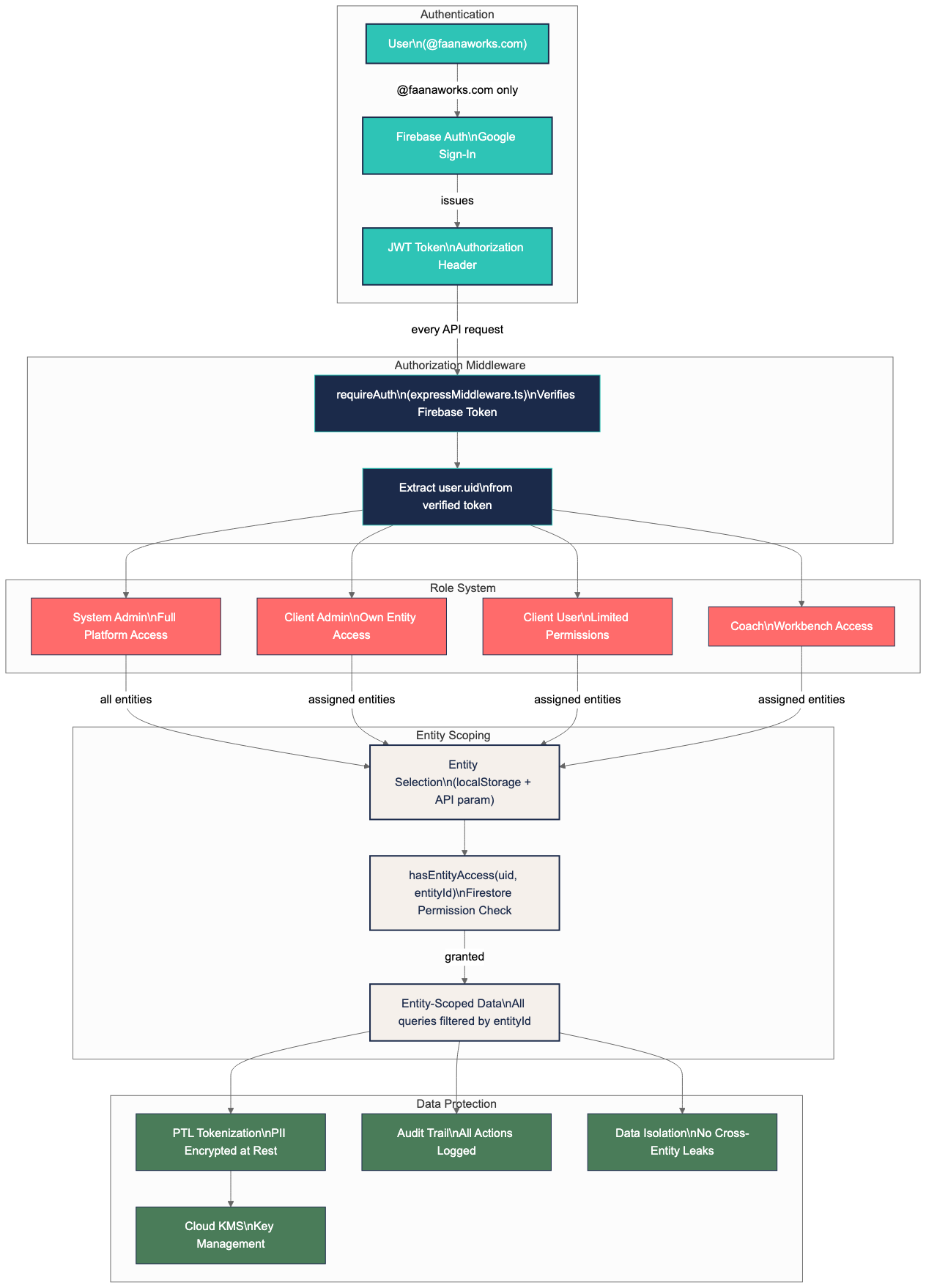
Authentication
All access requires a @faanaworks.com Google account authenticated through
Firebase Authentication. Every API request includes a JWT token in the Authorization header,
which is verified by the requireAuth middleware before any data access. The
Intelligence Hub shows an auth status indicator (green check = valid, red = needs refresh)
with a "Test Auth" option for manual re-verification.
Role-Based Access Control
| Role | Access Level | Typical User |
|---|---|---|
| Platform Admin | Full platform access across all entities, Admin Dashboard, New Codes in Workbench | Platform administrators, engineering team |
| Entity Admin | Full access to assigned entities only | Organization administrators, senior coaches |
| Entity Manager | Manage entity discovery and token associations | Data analysts, entity managers |
| Head Coach | Full Coach Home access for assigned entities | Lead coaches overseeing engagements |
| Assistant Coach | Coach Home access (limited scope) | Supporting coaches |
| Reports | Generate and export reports from templates | Report coordinators |
| Financial | Access to financial data | Financial analysts |
| Leadership | Access to leadership profile data | Leadership development staff |
| Personal | Access to HR/personal data | HR coordinators |
| Basic | Read-only access to assigned entities | Observers, participants |
Entity-Scoped Data Isolation
Every data query is filtered by entityId. The system verifies that the
authenticated user has permission to access the requested entity using
hasEntityAccess(uid, entityId) before returning any data. There is
no way to access data across entity boundaries without explicit permission.
The selected entity ID is stored in localStorage('selectedEntityId') and most
pages show a warning alert when no entity is selected.
Data Protection
- PII Tokenization (PTL): The Privacy Tokenization Layer uses Google Cloud’s
Data Loss Prevention API to detect sensitive information across eight categories — personal identifiers,
government-issued IDs, financial data, HIPAA-relevant health information, credentials and secrets, digital
identifiers, demographics, and organizational references — before any data is stored or processed.
Each value is replaced with an encrypted token (AES-256-GCM via Cloud KMS, keyring:
tokenization-keys) and the originals are stored in a separate, access-controlled location managed through role-based access control. Nothing downstream — not AI models, not databases, not analytics — ever sees the original values. The Global Token Pool resolves identity across tokenized sources without exposing original data. - Encryption at Rest: All Firestore, Cloud Storage, and BigQuery data is encrypted
at rest using Google-managed encryption keys (AES-256). Elasticsearch data on the
es-token-poolVM uses encrypted persistent disks. - Encryption in Transit: All API communication uses TLS 1.2+. Firebase Functions are served over HTTPS. Internal service-to-service calls (e.g., to Elasticsearch on the VPC) traverse Google's private network via VPC Connector.
- No Credentials in Code: Service account keys are managed through IAM and stored
in a gitignored
credentials/directory, never committed to version control. Cloud Functions use Application Default Credentials (ADC) in production. - Domain Restriction: Only
@faanaworks.comaccounts can authenticate. This is enforced at both the Firebase Auth provider level and the middleware layer. - MCP Tool Confirmation: AI chat always asks for user confirmation before taking destructive actions via MCP tools. Tool calls are logged with the requesting user, action, and timestamp for auditability.
AI Data Privacy
A critical design decision: no raw PII reaches any part of the platform. The PTL tokenization pipeline runs before any data is stored or processed — before it enters the Token Examiner, Behavioral Workbench, report generation pipeline, or any database. Google Cloud’s DLP API detects sensitive information across eight categories (personal identifiers, government-issued IDs, financial data, HIPAA-relevant health information, credentials, digital identifiers, demographics, and organizational references) and replaces each value with an encrypted token. AI models receive tokenized text (e.g., “PER_4821 discussed strategy with PER_7203”) and the detokenization happens only at the presentation layer, scoped to the authenticated user’s entity permissions. This means even if any system component were compromised, it would contain only meaningless tokens.
Session & API Security
- JWT Verification: Every API request includes a Firebase Auth JWT in the
Authorization: Bearerheader, verified byrequireAuthmiddleware - User ID from Token Only: Backend never accepts user IDs from client input —
always extracted from the verified JWT (
req.user.uid) - CORS Policy: Configured per API via
express-common.tsto allow only the known frontend origins - API Timeout: 30-second default timeout on all API calls; report generation sessions have a 5-minute timeout
The Privacy Stack — Three Layers of Protection
Faana's approach to AI privacy isn't a single mechanism — it's a layered defense that gets deeper with each architectural evolution:
- Layer 1: PTL Tokenization (Today) — Before any data is stored or processed, Google Cloud’s DLP API detects sensitive information across eight categories (personal identifiers, government-issued IDs, financial data, HIPAA-relevant health information, credentials, digital identifiers, demographics, and organizational references). All values are replaced with deterministic tokens encrypted via Cloud KMS (AES-256-GCM). Nothing downstream sees the originals. AI models receive text like “PER_4821 discussed strategy with PER_7203” — never real data. Detokenization happens only at the presentation layer, scoped to authenticated user permissions.
- Layer 2: Entity-Scoped Isolation (Today) — Every query, every AI prompt,
every vector search is filtered by
entityId. There is no cross-entity data leakage path. Even the AI Chat's MCP tools are entity-scoped. - Layer 3: Private LLM (Near-Term) — Migration from Google Vertex AI to a self-hosted language model means no data leaves Faana's infrastructure. Combined with PTL tokenization, this creates a double-lock: even the self-hosted model sees only tokens, and those tokens never traverse an external API.
Current AI Infrastructure
Today, the platform uses Google Vertex AI (Gemini model family) across 20+ integration points. The models are accessed two ways:
- Vertex AI SDK (direct): Used for structured output tasks where the model must return validated JSON schemas — Pass 0 date extraction, GOF storylines, behavioral code suggestions. Chosen over LangChain for prompts exceeding 120K characters.
- LangChain
ChatVertexAI: Used for agent-based tasks (Chat, Token Examiner Passes 1-3) where tool-calling, memory management, and callback handlers are needed. Provides a partial abstraction layer.
The prompt management system already stores model configuration (model name, temperature, max tokens) per prompt in Firestore, meaning model selection can be changed without code deploys for many features. This is the first step toward provider independence.
The near-term architecture roadmap includes migration to a self-hosted language model. This requires building an LLM abstraction layer (provider-agnostic factory pattern), migrating ~25 files from direct Vertex AI instantiation, and validating quality parity on all 4 Token Examiner passes. LangChain's model abstraction provides a foundation, but Vertex-specific features (structured output schemas, thinking budget control, 768-dim embeddings) will require careful replacement. The result: complete data sovereignty with zero external AI API calls, while preserving the PTL tokenization layer as an additional defense-in-depth.
Compliance & Roadmap
Faana Growth OS is currently in pre-beta development. Formal compliance certifications (SOC 2, HIPAA, GDPR) are planned as part of the enterprise readiness roadmap ahead of beta client onboarding. The architecture has been designed with these frameworks in mind — entity-scoped data isolation, eight-category DLP detection (including HIPAA-relevant health information), KMS-encrypted tokenization, role-based access, and audit logging are foundational, not retrofitted.
Note: The Audit Log tab in the Admin Dashboard currently uses placeholder data — see Section 4 for details. Full audit logging is planned for an upcoming release.
12. Feature Maturity Matrix
Faana Growth OS is a living platform under active development, designed to evolve as Faana executes on its data strategy and deepens integration with the full methodology. This matrix gives an honest assessment of every feature's current state. "Partial" and "Planned" features are not gaps — they're the roadmap. The platform's architecture supports incremental deepening: new Token Examiner passes, new fitness models, new Care economy features, and new AI capabilities are added as the methodology and data strategy advance.
Complete Fully functional with real data Mostly Complete Functional, minor gaps remain Partial Core works, some features in progress Planned In development, not yet functional Deprecated Superseded by another feature
Faana Workbench Features
| Feature | Status | Notes |
|---|---|---|
| Coach Home | Complete | Real API data, drag-and-drop portfolio, GOF grid, Portfolio Pulse |
| Org Player Card | Complete | Entity data, GOF blocks with per-block modals, leaders, pods, EIR |
| Person Player Card | Complete | 10 Leadership Qualities, GOF, radar chart, ego network. EIR tab built but not launched |
| Reports | Complete | Engagement summary, timeline, 5-step report generation, workflow tracking, send/export |
| Notebook | Complete | TipTap editor, file attachments, audio recording with live transcription, visibility controls |
| Care (CCM) | Partial | 4 sections working. Falls back to demo data when entity not seeded. Real path works |
| Faana AI Chat | Complete | Streaming, MCP tools, voice I/O, chat history, note-taking mode, report generation |
| Behavioral Workbench | Complete | All 3 panels functional with real data. Best used on desktop (Hub) |
| Admin Dashboard | Mostly Complete | Workbench: 5 tabs (User Mgmt, Brand Assets, Rollbacks, Coaching Pods, Audit Log). Hub: 4 tabs (no Coaching Pods) |
| Settings | Complete | Voice (28 voices, speed, volume), Display and Notifications coming soon |
Intelligence Hub Features
| Feature | Status | Notes |
|---|---|---|
| Entity Management | Complete | 5 tabs: Entity Discovery, Existing Entities, New Entity, Bulk Import, Global Token Pool |
| Data Management | Complete | Summary, Data Sources, Ingestion Points (Drive/Slack/Forms), Process Visibility, Shared Drives |
| Behavioral Workbench | Complete | Desktop-optimized 3-panel view with full keyboard shortcuts |
| Faana Agents | Complete | Agent Personas (prompt versioning), Smart Templates (HTML editor), IP Catalogue |
| Admin — User Management | Complete | Real users, 7 roles, Google Workspace photos, platform admin toggle |
| Admin — Brand Assets | Complete | 5 asset types, color picker, entity branding |
| Admin — Import Rollbacks | Complete | Rollback with confirmation, scheduling, history, export |
| Admin — Audit Log | Planned | UI complete but API not yet wired. Uses placeholder data |
| Care (CCM) | Partial | Same as Workbench Care — demo data fallback |
| Faana AI Chat | Complete | Full-page chat with same capabilities as Workbench |
| Document Management | Deprecated | Auto-redirects to Faana Agents |
Backend APIs
| API | Status | Notes |
|---|---|---|
| entityManagementApi | Complete | All GOF, quality assessments, EIR, coaching endpoints |
| snaApi | Complete | Vector search, behavioral codes, AI suggestions |
| chatMcpApi | Complete | Messages, streaming, MCP tool execution |
| authWorkspaceApi | Complete | Auth, users, shared drives, coaching pods |
| ingestionApi | Complete | Drive, Forms, file upload, manifests |
| notesApi | Complete | Notes CRUD, attachments, audio |
| promptManagementApi | Complete | Prompt versioning, categories, defaults |
| processVisibilityApi | Complete | Logging and pipeline tracking |
| adminApi | Complete | Backup management, ES browser |
| ptlApi | Complete | Tokenization, detokenization, statistics |
| dataManagementApi | Complete | GCS, BigQuery, Firestore queries |
| slackIngestionApi | Complete | OAuth, message ingestion, workspace mgmt |
| aiReportingApi | Mostly Complete | Report pipeline works. Chat continuation is stub |
| tokenExaminerApi | Partial | Core AI analysis works. Stub endpoints for vector search, temporal analysis |
| documentManagementApi | Partial | Template CRUD works. Stubs for duplication, sharing, PDF export |
| userSettingsApi | Complete | Voice, display, notification preferences |
| migrationApi | Complete | Legacy client-to-entity migration (platform admin only) |
| mcpApi | Complete | Standalone MCP tool endpoints |
| slackEntityApi | Complete | Slack bot entity creation commands |
Planned / In Development
| Feature | Description | Status |
|---|---|---|
| EIR Precision Fit | AI-powered behavioral matching — surfacing which coaches, programs, or EIR advisors are the right fit based on Leadership Genome patterns | Built, Not Launched |
| Audit Log API | Full platform action tracking with real data | In Development |
| Display Settings | Dark mode, density, animations in Settings | Coming Soon |
| Notification Settings | Email, browser, activity alert configuration | Coming Soon |
| Temporal Evolution View | Visualize relationship changes over time | In Development |
| Cross-Entity Linkage | Token Examiner vector search and linking | In Development |
| ILOS Panel | Additional leader card analysis panel | Planned |
| User-Scoped Data Model | Data capture without requiring entity selection first | April 2026 |
| Leadership Genome Benchmarking | Cross-client behavioral comparisons via Data Collective | Planned |
| Care Currency Card | Physical/digital care economy instrument with Tokens of Care | Planned |
| Innovation Deficit Research | Academic partnerships for leadership-innovation thesis | Planned |
| Always-On Proactive Agents | AI agents that monitor behavioral patterns, detect threshold violations, and initiate coaching interactions | Planned |
| Private LLM Migration | Self-hosted language model replacing Vertex AI for complete data sovereignty | Near-Term |
| Full-Chain Lineage Explorer | Trace any insight back through the complete pipeline to source documents | Planned |
13. Appendix
Supported File Types
| Type | Extension | Processing |
|---|---|---|
| Text extraction, tokenization, AI analysis | ||
| Word | .docx | Text extraction, tokenization, AI analysis |
| Excel | .xlsx | Data extraction, structured analysis |
| Plain Text | .txt | Direct tokenization and analysis |
| Markdown | .md | Direct tokenization and analysis |
| HTML | .html | Content extraction, tokenization |
| JSON | .json | Structured data import |
Entity Types
| Type | Description | Examples |
|---|---|---|
| Organization | Company, agency, or institution | Coffee Co, Faana Works |
| Person | Individual leader, coach, or participant | Team leads, executives, coaches |
| Program | Coaching engagement or training initiative | Leadership Accelerator, Q1 Cohort |
| Community | Network, cohort, or team grouping | Senior Leadership Network, Alumni Group |
AI Models Used
| Model | Use Case | Why This Model |
|---|---|---|
| Gemini 2.5 Flash | Fast inference, date extraction | Fast, cost-effective, with thinkingBudget control |
| Gemini 2.0 Flash Exp | Agent tool-calling, deep analysis | Best for multi-step reasoning with tools |
| Gemini 1.5 Pro | Legacy fallback | Retained as fallback in prompt defaults; primary use replaced by 2.5 Flash / 2.0 Flash |
| text-embedding-004 | Vector embeddings | 768-dimensional, optimized for similarity search |
| Kokoro TTS | Text-to-speech in Chat | 28 voices (11 Am. female, 9 Am. male, 4 Br. female, 4 Br. male) |
Faana Growth OS Platform Guide — March 2026
Built with care by the Faana engineering team.